


On April 14, 2026, Anthropic quietly shipped a feature that most of the internet is still sleeping on.
It’s called Routines. And if you’re a solopreneur, freelancer, or agency owner who’s been duct-taping together automations with Zapier, n8n, Make.com, or a prayer… this is the replacement you didn’t know was coming.
I’ve been poking at Routines since the day they dropped. Not as a developer reviewing documentation, but as someone who runs a one-person operation and needs things to work while I’m not staring at a screen.
So forget the technical jargon. I’m going to walk you through what Routines actually are, when they make sense (and when they don’t), what they cost in real dollars, and how to set up your first one today.
You don’t need coding skills, or any prior Claude experience. Just about 10 minutes.
If you’re brand new to Claude, start with my beginner’s guide first, then come back.
What Are Claude Routines, Actually?
Think of a Routine as a set of instructions you give Claude once, and it runs them on autopilot, whenever you want, however often you want.
Three ingredients:
- A prompt — what you want Claude to do (written in regular, everyday language)
- Connectors — the tools Claude can access while doing it (Slack, Notion, Google Calendar, GitHub, Linear, etc.)
- A trigger — what kicks it off (a timer, an external event, or you pressing a button)
You package those three things together, hit save, and Claude runs it on Anthropic’s cloud servers. Your machine can be off, you can be asleep, you can be on a beach in Bali arguing with a monkey over a coconut, the Routine still fires on schedule because it’s running on their infrastructure, not yours.
This is different from a normal Claude conversation where you type something and wait for an answer.
A Routine is more like hiring a very competent (and very cheap) assistant who shows up at the same time every day, does the exact task you assigned, and never calls in sick.
Current status: Routines are in research preview. That means Anthropic is still tweaking things. Features might change. But everything I’m covering here works right now.
The 3 Trigger Types
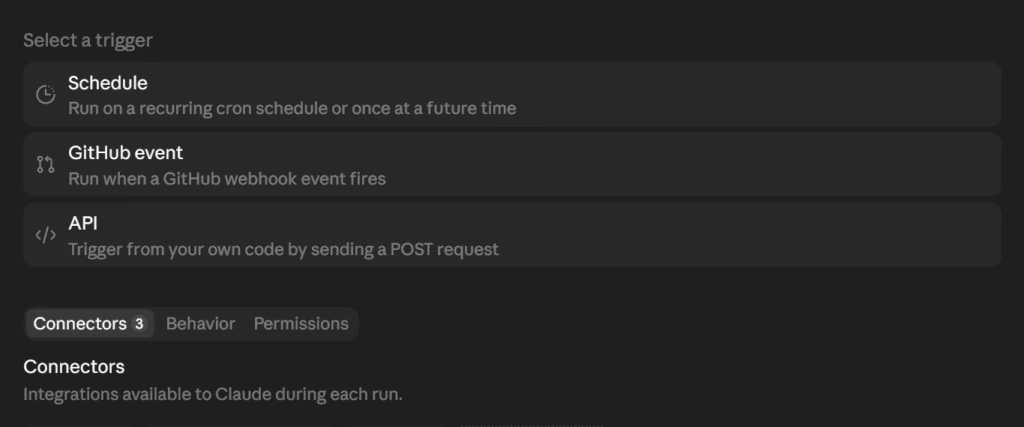
Every Routine needs a trigger. Something that says “go.” You get three options, and you can actually combine all three on a single Routine if you want.
Scheduled Triggers
This is the simplest one. You tell Claude “run this every morning at 9 AM” or “run this every Monday” or “run this once an hour.”
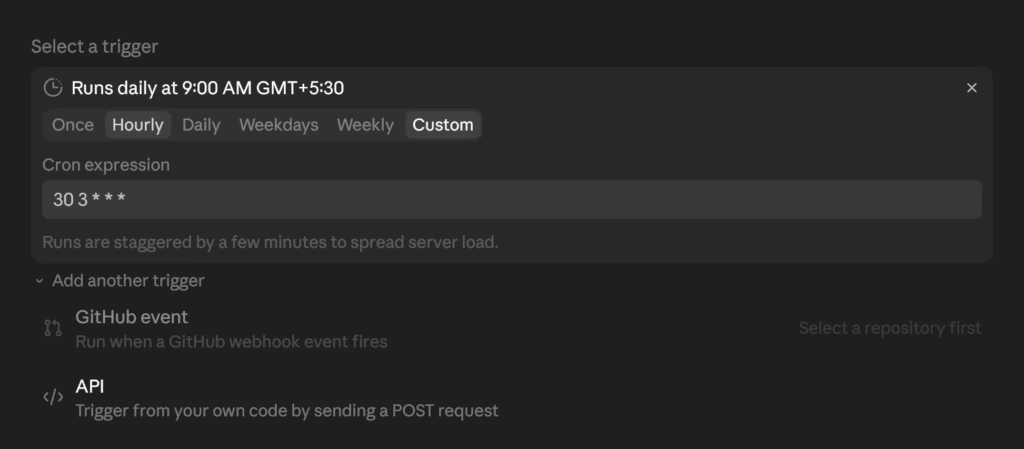
Presets include once, hourly, daily, weekdays, and weekly. If you need something more specific (like “every Tuesday and Thursday at 2 PM”), you can set a custom schedule using the “Custom” tab in the trigger selector, or update it later via /schedule → Update in the CLI.
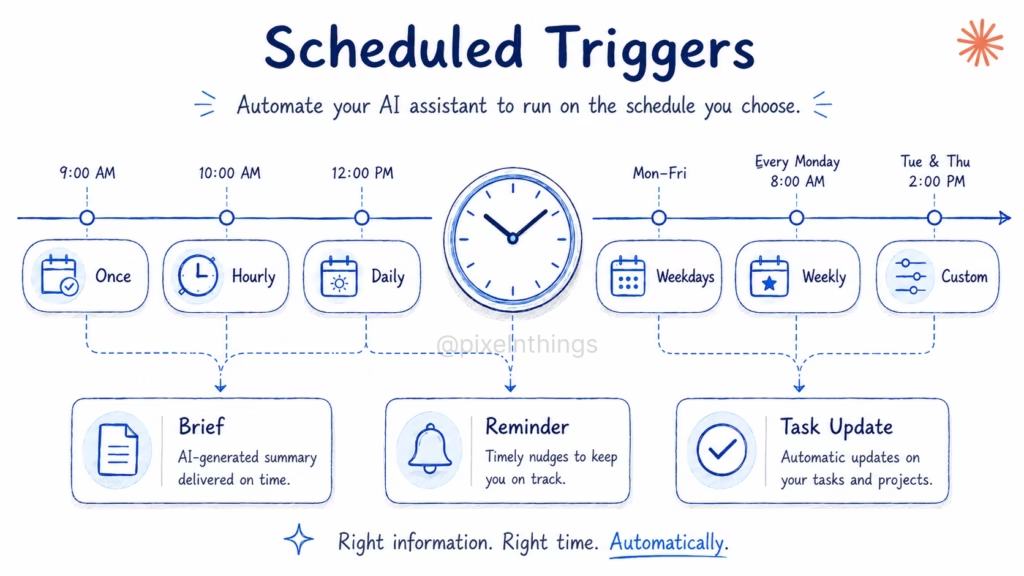
One limitation: the minimum interval is one hour. You can’t run something every 5 minutes. Yes, there’s a Custom tab with a cron expression field, and if you know cron, you’ll be tempted to type */5 * * * * and call it a day. It won’t work.
The system enforces the one-hour floor regardless of what cron string you enter. For most solopreneur use cases, hourly is more than enough. If you need sub-minute automation, you’re probably looking at a different tool anyway.
For example: Every Monday morning, Claude pulls your upcoming calendar events, checks your Notion task board, and posts a “Weekly Priority Brief” to your Slack channel. You wake up, open Slack, and your week is already organized.
API Triggers
This sounds technical. It’s not.
An API trigger means “something external tells Claude to run.” You get a unique secret token. When another tool sends a request to that URL, the Routine fires.
A simple translation: when something happens in another app, Claude wakes up and does its job.
For example: A new lead fills out your GoHighLevel form. GHL sends a webhook to your Routine’s URL. Claude reads the lead’s info, drafts a personalized follow-up email, logs it in your CRM notes, and posts a summary to Slack.
By the time you check your phone, the lead already has a warm email in their inbox.
Important: when you create an API trigger, Claude shows you the secret token exactly once. Save it immediately. There’s no “forgot my token” button. Treat it like a password.
GitHub Triggers
This one fires when something happens in a code repository, a pull request opens, a release gets published, someone pushes code.
I’ll be blunt. If you’re reading this as a non-developer, you probably won’t use this trigger type, and that’s fine. The first two cover most of what non-developers need.
But if you ARE building things (even as a vibe coder), GitHub triggers can do some wild stuff. Auto-review your pull requests. Check your code for issues. Update documentation when files change. Worth knowing it exists.
Routines vs Cowork Scheduled Tasks vs Hooks
Claude now has three different ways to automate things, and honestly, the overlap confuses most people. Here’s how they actually differ.
| Hooks | Scheduled Tasks | Routines | |
|---|---|---|---|
| Where it runs | Your machine, or cloud if repo-committed | Your machine (local) | Anthropic’s cloud |
| Machine must be on? | Yes (local only) | Yes | No |
| Can access local files? | Yes (local only) | Yes | No (clones repo fresh each run) |
| Trigger types | Lifecycle events (file edits, tool calls, session start, permissions, etc.) | Time-based (+ on-demand) | Schedule, API, GitHub webhooks |
| Setup | JSON config + optional scripts | Desktop app, CLI, or conversational (no code) | Web UI, Desktop app, or CLI |
| Best for | Enforcing rules and automating reactions as you work | Recurring local tasks while your machine is on | Unattended automations that run without you |
The decision:
- Need to automate something that touches files on your computer? → Cowork Scheduled Tasks
- Need something to fire instantly while you’re actively working in Claude Code? → Hooks
- Need something to run in the background whether your laptop is open or not? → Routines
Most solopreneurs will use Routines for the big recurring stuff (weekly reports, lead processing, content scheduling) and Cowork Tasks for local things (organizing files, daily journal prompts, updating your Obsidian vault).
If you want the full picture on Cowork, I wrote a setup guide that covers scheduled tasks in detail. And if you want to go deeper on Hooks, my Skills and Hooks guide covers all hook events.
7 Routines Every Solopreneur Should Set Up
Every other article about Routines talks about pull request reviews and deployment checks. That’s fine if you’re a Dev engineer at a company with 40 developers. If you’re running a one-person business, none of that applies to you.
These are Routines built for people who sell things, make content, and run operations without a team. They’re ordered from simple (you can set up the first one in 10 minutes) to advanced (requires a custom MCP connector, but the payoff is worth the setup).
Every Routine listed here uses connectors that are either pre-built in Claude’s directory or available as custom MCP servers you can add yourself.
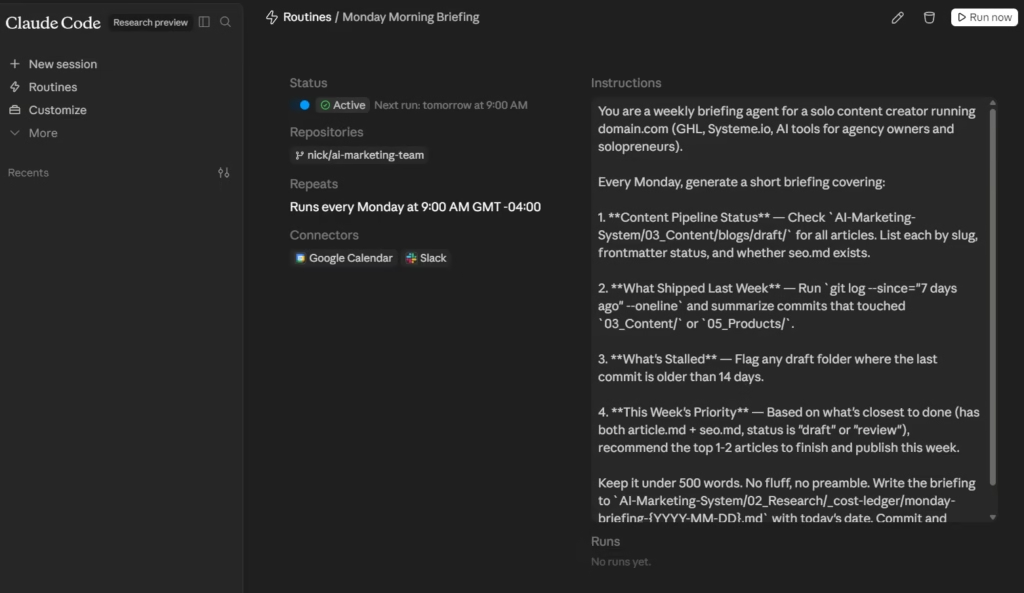
The Monday Morning Briefing
Trigger: Scheduled — every Monday at 9 AM
Connectors: Google Calendar + Slack
Claude pulls your Google Calendar for the next 7 days, flags back-to-back days, identifies meetings without agendas, and posts a structured weekly summary to a Slack channel.
The prompt is where you make it useful. Tell Claude what you actually care about: “Flag any day with more than 3 calls. Highlight gaps longer than 2 hours for deep work. List recurring meetings I haven’t attended in 2 weeks.” The more specific your prompt, the less filtering you do Monday morning.
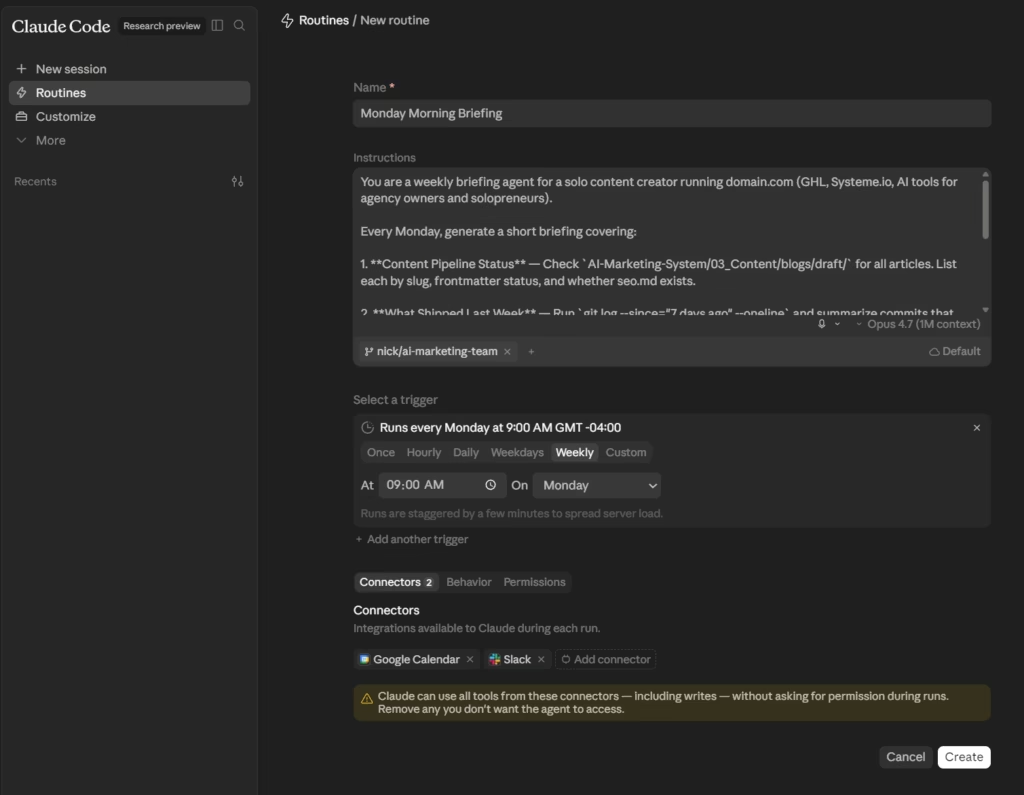
Why this one first: Two of the most common pre-built connectors, 5 minutes to set up, and it gives you an immediate feel for how Routines work before you build anything more complex.
The Ghost Writer Pipeline
Trigger: Scheduled — every morning at 6 AM
Connectors: Google Drive + Notion + Slack
Create a “Sources” folder in Google Drive or Notion. Throughout the week, save articles, competitor posts, notes, anything that catches your attention. Most solopreneurs already do this. The problem is that folder turns into a graveyard of good intentions.
Every morning at 6 AM, Claude scans that folder for anything added in the last 24 hours, pulls out the core ideas, and drafts 3 content angles from each source: a LinkedIn post, an X thread hook, and a newsletter paragraph. Drops everything into your Notion content calendar with a summary in Slack.
You wake up editing drafts instead of creating from scratch. Completely different level of friction.
Prompt tip: Include your niche and audience so the angles aren’t generic. “I write for solopreneurs who use AI tools, this software, and no-code platforms. Every angle should connect back to building or selling something, not abstract.”
Competitor Content Scout
Trigger: Scheduled — every Friday at noon
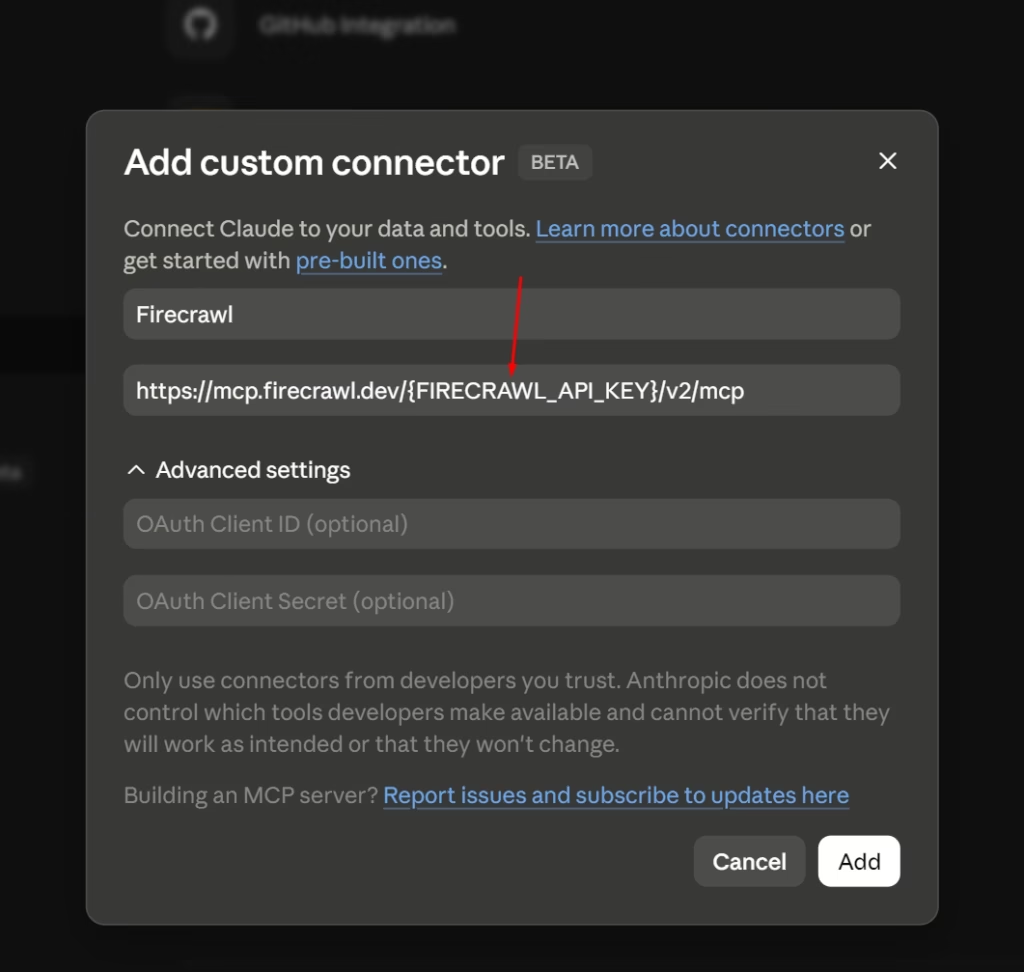
Connectors: Firecrawl (custom MCP) + Notion or Slack
Requires adding Firecrawl as a custom MCP connector (Settings → Connectors → Add custom connector, paste Firecrawl’s MCP server URL and add your API key).
Every Friday, Claude scrapes 5-10 competitor websites you specify. Not just pricing pages. Blog posts, changelogs, landing pages, feature comparison tables.
It compares against the previous week’s scrape (stored in Notion) and generates a report covering: what changed on their sites, what content they published that you haven’t covered, and positioning gaps where they’re weak.
Pricing barely changes week to week for most SaaS products. Content strategy, feature messaging, and competitive positioning change constantly. That’s the intelligence that actually helps you make decisions.
Setup note: Firecrawl handles web scraping through its own MCP connector. Claude’s cloud environment doesn’t need special network permissions for this. Just make sure Firecrawl is connected under Settings → Connectors before creating the Routine.
Lead Research and Draft Response
Trigger: API — fires when a new lead enters your CRM
Connectors: Firecrawl (custom MCP) + Slack
When a lead submits a form (GoHighLevel, HubSpot, Typeform), your form tool sends a webhook to the Routine’s API endpoint. Claude receives the lead’s info, uses Firecrawl to scan their company website and social presence, and drafts a follow-up that references their specific business.
Logs the draft, research summary, and company link in Slack.
The lead gets a response that feels like you spent 15 minutes researching them. You spent zero, and because API triggers fire within seconds, your response lands while they’re still thinking about you.
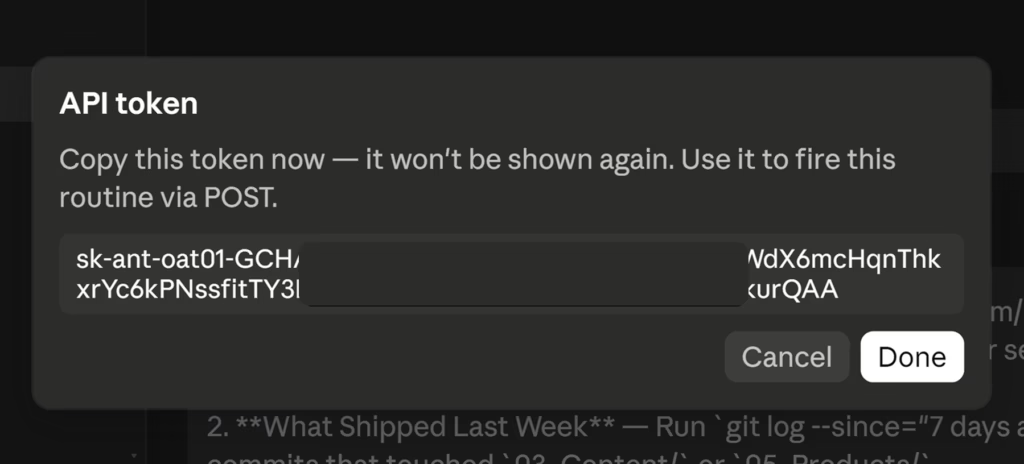
Important: When you create the API trigger, Claude shows you the secret token exactly once. Copy it immediately and store it somewhere safe. Your CRM needs this token in the webhook Authorization header. Lose it and you’ll need to regenerate, which invalidates the old one.
Content-to-Distribution Machine
Trigger: GitHub — fires when a transcript file is pushed to your repo
Connectors: Notion + Slack
If you create podcasts, YouTube videos, or webinars, you know recording is the easy part. Distribution is where solopreneurs give up. This Routine handles it.
Push a transcript file to a GitHub repo. Claude reads it and generates: 3 LinkedIn post drafts with different hooks, an SEO-optimized YouTube description with timestamps, a newsletter section, 5 X/Twitter hooks from the strongest quotes, and a blog post draft restructured for reading.
Everything lands in a Notion database organized by platform and status, with a Slack notification.
One transcript in. Seven platform-ready drafts out. You’re starting from 70% done instead of zero.
For non-developers: Create a free GitHub account, make a private repo called content-transcripts, and drag .txt files into it through the web interface. That upload counts as a “push” and triggers the Routine. No code required.
Autonomous Market Researcher
Trigger: API — fired manually from Slack or your phone
Connectors: Firecrawl (custom MCP) + Ahrefs + Notion + Slack
You trigger this one on demand with a Slack command or an iOS Shortcut that makes an HTTP POST request. Include a topic or keyword in the request body.
Claude scrapes the top 10 ranking articles for that keyword via Firecrawl, pulls Ahrefs data on keyword difficulty and search volume, cross-references against your existing content in Notion, and identifies gaps.
The output is a full Research Brief in Notion: top-ranking content with links, angles they all miss, keyword data, and 3-5 suggested article angles targeting content gaps. Summary posts to Slack.
Instead of spending 2 hours on research before writing a single word, you fire one API call while walking the dog. Brief is ready when you sit down.
Prompt structure matters: Include your domain so Claude checks what you’ve published. Include your niche. Include standards like “Only suggest angles where I can write from practitioner experience. No ‘ultimate guide’ filler. Every angle needs a specific hook and a reason it beats what’s currently ranking.”
Auto Bug Fixer
Trigger: GitHub — fires when an issue is labeled “bug”
Connectors: GitHub (built-in) + Slack
For solopreneurs who build software, run SaaS apps, or vibe code products that real users interact with. If you don’t maintain a codebase, skip this and double down on Routines 1 through 6.
When a GitHub issue gets labeled “bug,” Claude clones your repo in the cloud, reads the report, locates the relevant code, writes a test case that reproduces the issue, attempts a fix, and opens a draft PR with the fix and passing test logs. Summary posts to Slack.
You wake up to a “Bug Fix Ready” PR instead of an unread bug report. Even when Claude’s fix isn’t perfect, it’s usually 80% there, cutting your debugging from an hour to 10 minutes.
Guardrail tip: Add this to your prompt: “Do not merge anything. Open all fixes as draft PRs on a claude/fix- prefixed branch. Tag me for review.” Routines run autonomously with no permission prompts, so make sure Claude proposes changes rather than shipping them to production.
How Much Do Claude Routines Cost?
Routines are included in your Claude subscription. No extra fees per run. Each Routine run draws from the same usage pool as your regular Claude conversations.
The only thing that varies by plan is how many Routine runs you get per day:
Plan Limits
| Plan | Routines Per Day |
|---|---|
| Pro ($20/month) | 5 |
| Max 5x ($100/month) | 15 |
| Max 20x ($200/month) | 15 |
| Team | 25 |
| Enterprise | 25 |
Both Max tiers cap at 15 Routine runs per day. The 20x plan gives you more message capacity for regular Claude conversations, but Anthropic hasn’t bumped the Routine limit for it (yet).
NOTE: Testing is free. When you hit “Run now” to test a Routine, it doesn’t count against your daily run limit. Only runs fired by a schedule, API call, or GitHub event eat into the cap. Test runs still use your regular subscription usage (tokens and compute), they just don’t subtract from your daily Routine count.
For a full breakdown of what each plan includes beyond Routines, check my Claude Pro vs Max vs Free comparison.
Routines vs Zapier/Make/n8n
The difference isn’t price. It’s what the automation can actually do.
Zapier, Make, and n8n move data between apps. They’re good at that, but they can’t think about what they’re moving. Try getting Zapier to read a lead’s form submission, figure out what kind of business they run, and draft a personalized follow-up that references their specific situation.
You’d need a chain of zaps, a GPT integration, and a lot of patience.
Claude does that in one Routine. One prompt. The automation engine IS the AI.
The traditional tools still win in a few spots though:
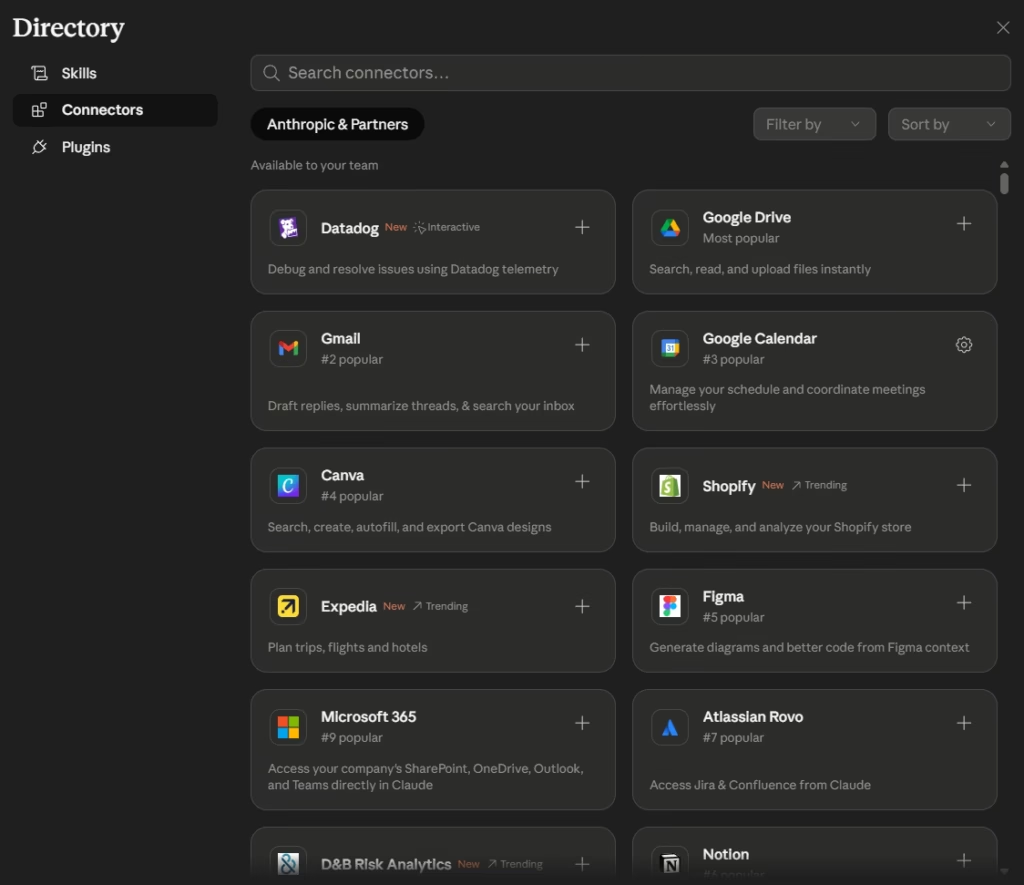
- Connector count. Claude’s directory has approaching 300 integrations and growing. Zapier has thousands. If you need a connector for some obscure industry tool that Claude doesn’t support yet, you’re either adding it yourself as a custom MCP server or reaching for Zapier. The custom MCP route is worth trying first since it takes about 2 minutes (you saw the Firecrawl setup in the Routines above), but not every app publishes an MCP server URL.
- Speed. Claude runs on LLM inference, which means a few seconds per step. If your automation needs to fire in milliseconds (payment processing, real-time bidding, instant webhook responses), traditional tools are faster.
- Volume on a budget. Pro gives you 5 Routine runs per day. If you need 20+ daily automations on $20/month, you’ll need to upgrade to Max (15/day at $100/month) or Team (25/day).
How to Set Up Your First Routine (Step by Step)
Two ways to do this: the web UI or the CLI.
Web UI Method
Step 1: Go to claude.ai/code/routines
Step 2: Connect your tools first. Head to claude.ai/settings/connectors and link whatever you need, Slack, Notion, Google Calendar, etc. Do this BEFORE creating the Routine. Claude can’t use tools it can’t see.
Step 3: Click “New routine.” Give it a clear name. Something like “Monday Morning Brief” not “Routine 1.”
Step 4: Write your prompt. This is the most important part. Be specific. Don’t say “summarize my week.” Say “Pull all events from my Google Calendar for the next 7 days. Check my Notion board for tasks tagged ‘urgent’ or ‘high priority.’ Compile a summary with three sections: Calendar, Priority Tasks, and Deadlines. Post it to the #weekly-brief channel in Slack.”
The more specific your prompt, the better the output. Claude is smart, but it’s not psychic.
Step 5: Add a trigger. Click the trigger type you want (scheduled, API, or GitHub), set the details, and save.
Step 6: Hit “Run now” to test it. Watch the output. Tweak the prompt if needed. Repeat until it’s dialed.
The Three Tabs You Should Know About
Below the trigger section, you’ll see three tabs: Connectors, Behavior, and Permissions. Quick rundown.
Connectors
Connectors is where you attach the tools your Routine can use during each run. Slack, Google Calendar, Ahrefs, whatever you linked in Step 2 shows up here.
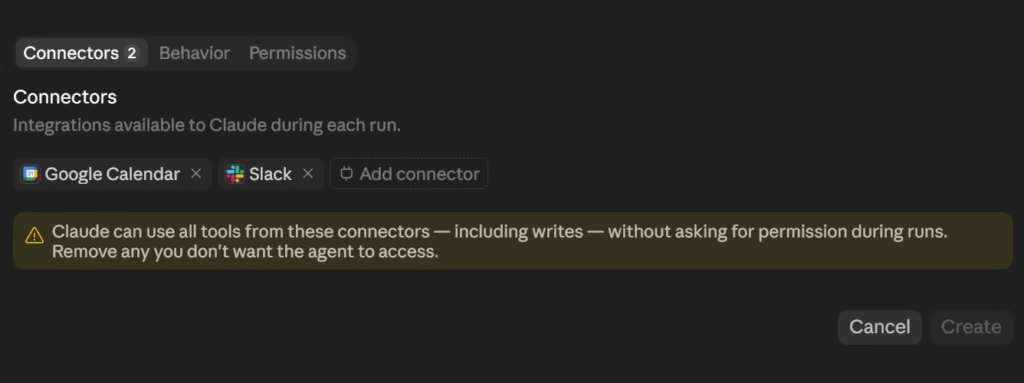
Add only what the Routine actually needs. The warning at the bottom: Claude can use all tools from these connectors, including writes, without asking you first. If you don’t want a Routine accidentally posting to Slack, don’t attach Slack to it.
Behavior
It has one toggle: Auto-fix pull requests. When turned on, Claude watches for CI failures and review comments on PRs that the Routine created, then pushes fixes automatically.
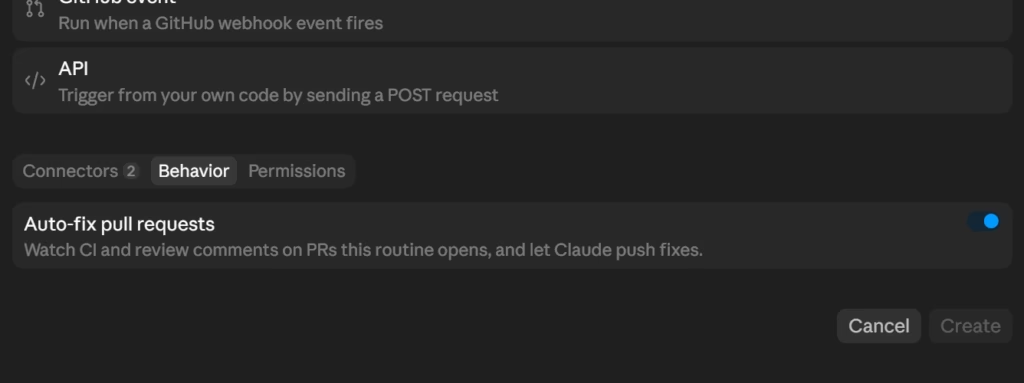
Most people won’t touch this. If you’re a developer using Routines for code reviews or automated PRs, it’s useful. Everyone else can skip it.
Permissions
It also has one toggle: Allow unrestricted git push. This controls whether Claude can push code directly to any branch in your repo (including main) or whether it has to create a pull request for you to review first.
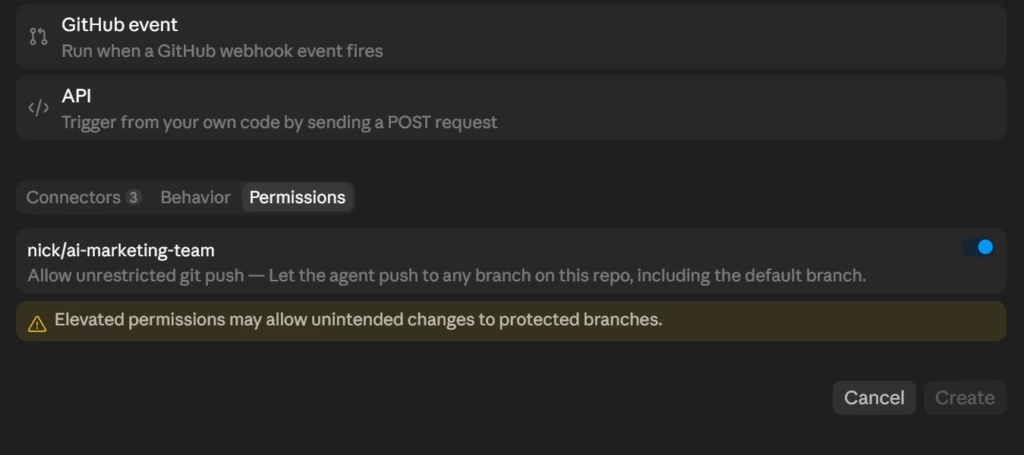
Think of it like giving someone the keys to your house vs making them knock first. If you’re just starting out, leave it off. Let Claude create a PR so you can check the work before it goes live. Turn it on later once you trust the Routine’s output.
NOTE: Don’t want to write the prompt yourself? Use the CLI method below. When you type /schedule in Claude Code and pick “Create,” Claude asks you what the Routine should do, then writes the prompt, picks the schedule, and sets up the config for you. The web UI and Desktop app don’t do this yet, you fill everything in manually.
CLI Method (For Those Who Want It)
If you use Claude Code, type /schedule in the terminal. You’ll get an interactive menu: Create, List, Update, Run Now. Pick one, describe what you want, and Claude builds the Routine for you.
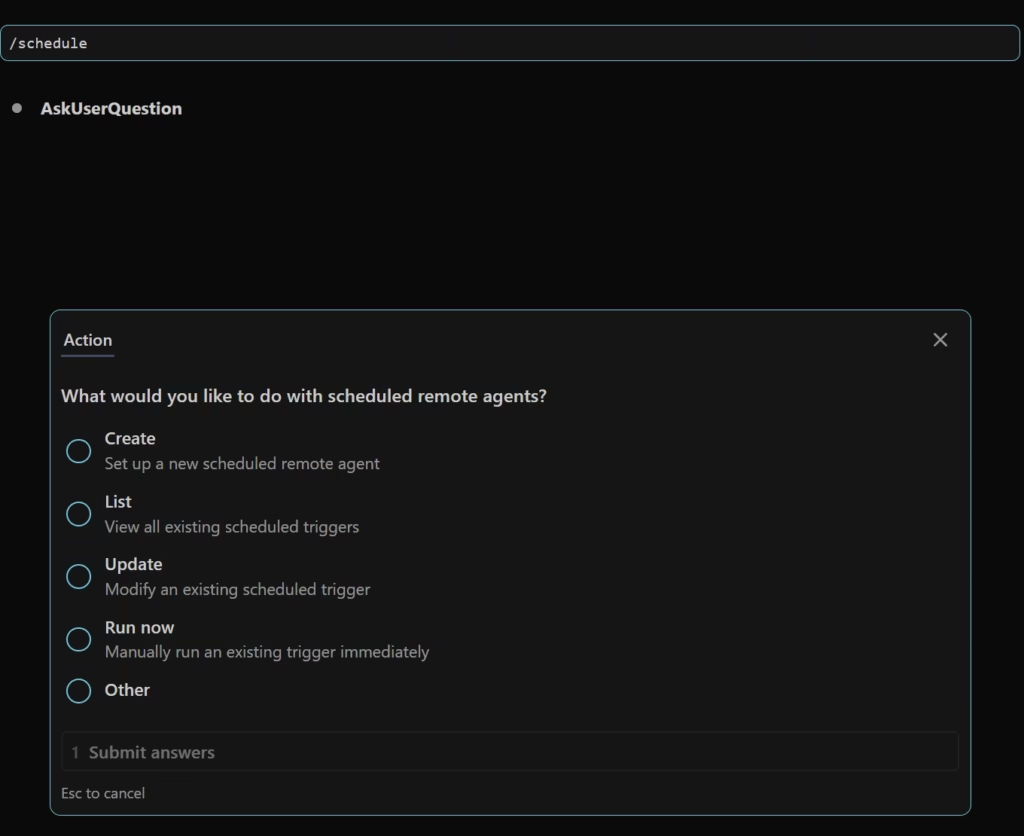
Once created, the Routine shows up everywhere automatically, the web UI at claude.ai/code/routines, the Claude Desktop app (under the Code tab → Routines), and the CLI via /schedule → List.
You can trigger a manual run from any of those three places. Web UI and Desktop have a “Run now” button. CLI has the “Run Now” option in the /schedule menu.
When NOT to Use Routines
I could write a puff piece pretending Routines are perfect. That’s not my style.
Don’t use Routines when:
- You need access to files on your computer. Routines run on Anthropic’s cloud. They can’t see your local files. For local automation, use Cowork Scheduled Tasks instead.
- You need instant, sub-second reactions. A Routine takes a few seconds to spin up. If you need something to fire the instant a file changes or a button is pressed, Hooks are your move.
- You need a connector that doesn’t exist yet. Claude currently supports Slack, Notion, Google Calendar, Linear, GitHub, and a growing list of others. But if you need a very specific integration (like connecting directly to your accounting software or a niche CRM), you might be stuck waiting. Check the connectors page for the current list.
- You’re on Pro and need more than 5 runs per day. That’s the ceiling. If your workflow demands more, you’ll need Max ($100/month for 15 runs) or Team ($25/user/month for 25 runs). Factor that in before you build a system that depends on 20 daily Routines.
- You need 100% uptime guarantees. Routines are in research preview. Things are stable, but Anthropic is still iterating. I wouldn’t bet a mission-critical business process on a research preview. Use it for things where a missed run is annoying, not catastrophic.
What’s Coming Next
Routines are a research preview, which means Anthropic is actively building.
A few things I’m watching:
More trigger sources. Right now, GitHub is the only event-based trigger beyond scheduled and API. Anthropic has confirmed they plan to expand webhook-based triggers to more event sources.
That could mean native Slack events, email events, or CRM events without needing to wire up API webhooks manually.
Ultraplan integration. Anthropic launched Ultraplan (also in research preview), a cloud-based planning system for Claude Code. You describe a complex task, Claude drafts a multi-step plan in the cloud while your terminal stays free, then you review and approve it in your browser before executing.
Pair that with Routines and you’re looking at a world where Claude plans, executes, and delivers results on a schedule without you touching anything
Better observability. Each Routine has a “Runs” section that shows past executions, but it’s still basic. I’d expect Anthropic to build more detailed monitoring, success/failure tracking, error alerts, and easier debugging. It’s the obvious next step.
The connector library keeps growing. It’s already at nearly 300 integrations as of this writing, including consumer apps. That number is going to keep climbing, which means fewer reasons to reach for Zapier or Make.
The Bottom Line
Claude Routines are the most underpriced automation tool on the market right now. For $20/month on Pro, you get an AI assistant that runs tasks in the background, connects to your tools, and actually thinks about what it’s doing, not just shuffling data between apps.
Is it perfect? No. The connector library is still growing. The daily run limits are tight on Pro, and it’s in research preview, so things will change.
But here’s what I keep coming back to: Anthropic is shipping updates at a pace that’s hard to keep up with. You wake up, there’s a new feature. You go to sleep, something else got announced. I’d bet Routines will look very different (and more powerful) three months from now.
The gap between what Routines can do today and what you’d pay for the same thing on Make or Zapier is already significant. And at the rate Anthropic is moving, that gap is only going to get wider.
Set up one Routine this week. Just one. The Monday Morning Brief is a good starting point. See how it feels to open Slack and have your week already organized without you touching anything.
Then build the second one. And the third. That’s how you stop doing the work your AI should be doing for you.
See you in the next post. PEACE ✌
Frequently Asked Questions
About

Nick Chauhan
Web Developer & Founder Of PixelNThings
I build AI-powered systems that actually ship. Agents, automations, full-stack apps. Claude, Cursor, Gemini, MCP, n8n, Stitch etc.. Also design high-converting funnels and website on Systeme.io, WordPress & GoHighLevel. I post what I build.

