


Most comparisons of Claude’s plans read like the pricing page. They list the features, note the costs, say “Pro is good for most people,” and move on.
That’s not useful if you’re trying to figure out whether $20/month actually buys you something meaningful, or whether $100/month is justified or just aspirational spending.
This is the version where I actually tell you what breaks at each tier, what you’re buying, and, most importantly, the move that most solopreneurs miss when they start hitting Pro limits.
The Four Plans, Straight
As of April 2026…
| Plan | Cost | Who it’s for |
|---|---|---|
| Free | $0 | Testing, light use, occasional questions |
| Pro | $20/mo ($17 annual) | Daily work, writing, research, coding, automation |
| Max 5x | $100/mo | Consistently hitting Pro limits, heavy daily sessions |
| Max 20x | $200/mo | Power users, developers shipping production code all day |
There’s also Team ($25/seat standard, $100/seat premium, minimum 5 seats) and Enterprise (custom). If you’re a solo operator, those aren’t your conversation right now.
What Free Actually Gives You in 2026
Anthropic upgraded the Free tier in February 2026. It’s genuinely more capable than it was a year ago.
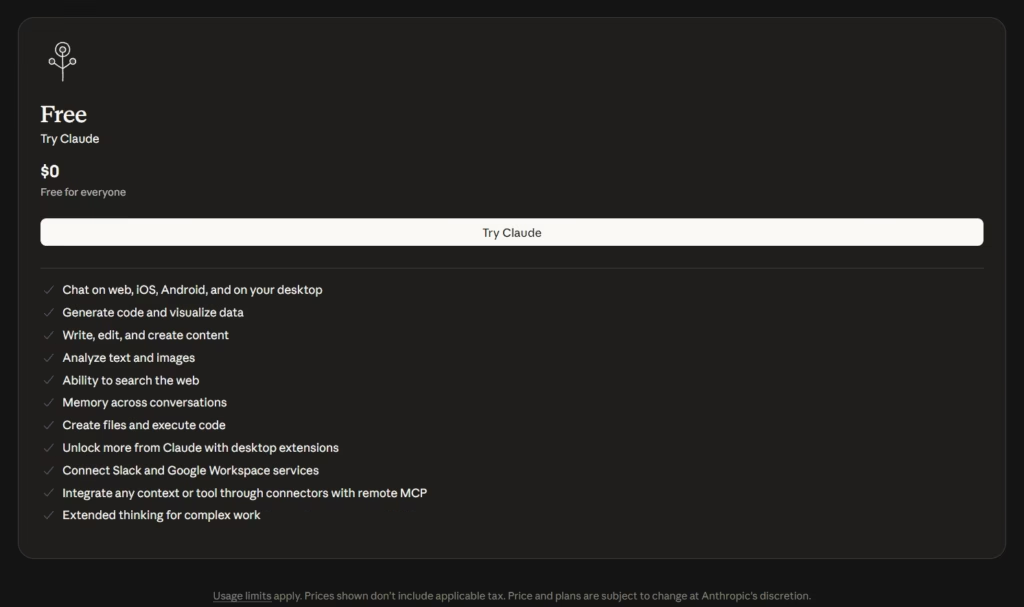
What you get:
- Claude Sonnet 4.5 in the browser (claude.ai)
- Web search
- File uploads and analysis
- Artifacts
- Around 10 prompts per 5-hour window before you hit the wall
What you don’t get:
- Claude Code (terminal, desktop, or web)
- Cowork tab
- Computer use
- Dispatch (mobile-to-desktop task routing)
- Extended thinking
- Opus 4.6
- Projects (persistent context across sessions)
If you’re testing Claude to see if it fits how you work, Free is the right starting point. If you’ve already decided it fits and you’re trying to use it for real work, you’ll hit the limit in a single session and spend the rest of your day waiting for it to reset.
Free is a demo. Use it as one.
Pro at $20/Month: What You’re Actually Buying
Pro unlocks everything. That’s the short version.
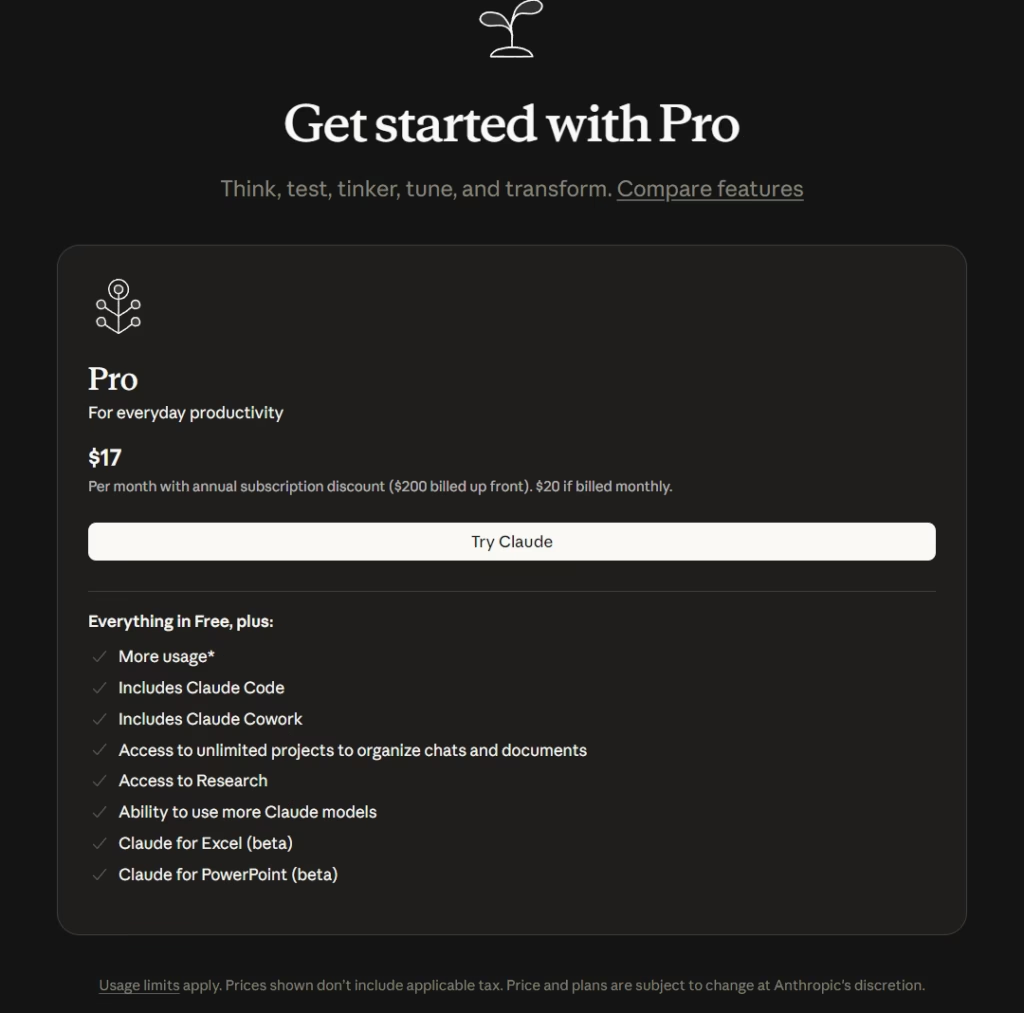
The longer version… Pro gives you access to the full Claude Desktop app with all three tabs, Chat, Code, and Cowork.
It adds computer use (open apps, click, navigate your screen). It adds Dispatch so you can send tasks from your phone to your desktop.
It adds Projects for persistent memory across sessions. It adds extended thinking for complex reasoning tasks. And it gives you Opus 4.6 access, Anthropic’s most capable model.
At $20/month (or $17 if annually), Pro lines up directly with ChatGPT Plus at the same price. The meaningful differences…
- Context window: Both run a 200K-class window in their consumer chat. The headline 1M token contexts on both sides are terminal-only, Claude via Claude Code, OpenAI via Codex. If you’re working with long docs or full codebases, that’s where the real ceiling lives, not in the chat box.
- Usage limits: ChatGPT Plus runs about 80 thinking messages per 3 hours. Claude Pro is roughly 45 messages per 5 hours. ChatGPT gives you more shots, Claude trades volume for depth. Batch big reasoning tasks and Claude’s window goes further per message. Ping-pong all day and ChatGPT lasts longer.
- Features: Claude Pro ships with Cowork (desktop agent for file and task automation) and computer use baked into the workflow. ChatGPT Plus has native computer use on GPT-5.4, OpenAI’s first general-purpose model that can actually drive a desktop. Both camps now have a computer-use story… the difference is Claude leans AI-native knowledge work, OpenAI leans browser automation.
The real Pro limit experience
The 45 messages per 5-hour window sounds like a lot until you’re in the middle of a coding session.
Longer prompts with large context windows burn through the quota faster than short messages.
If you’re pasting in a full codebase and asking Claude Code to refactor it across multiple files, you can hit the wall in 2-3 hours or maybe even less of real work. Not because you sent 45 messages, the token cost of each exchange adds up.
For writing, research, and lighter coding tasks, Pro holds up well for a full day’s work. For heavy Claude Code sessions, building features, debugging complex systems, running multiple back-and-forth iterations, expect to hit limits a few times a week if you’re working hard.
Most of those token-burns come from feeding Claude the wrong context at the wrong time. If you’re using Claude Code for research-heavy work specifically, the 6-prompt research workflow I run inside Claude Code cuts the back-and-forth dramatically and stretches a single Pro session a lot further.
Is Pro worth $20/month? Yes, without question, if you’re using Claude daily. The unlock of Claude Code and Cowork alone justifies it for most solopreneurs. The question is whether you need Max.
If you’re trying to figure out whether Claude Pro fits inside a wider toolkit, I broke down the full 2026 vibe coder stack here, eight categories, real prices, and the cheap lane that runs $35 to $50/month instead of the $300 most stack posts push.
The Move Most People Miss: Extra Usage
Before you jump from Pro to Max 5x at $100/month, there’s a middle path most beginners miss. And as of 2026, it lives inside the Claude app itself, no API keys, no developer setup, no separate billing.
It’s called Extra Usage, and it’s a toggle in your Claude.ai settings.
Here’s how it works. You flip Extra Usage on, set a monthly spend cap (you choose, $20, $50, $100, whatever), and prepay a credit balance.
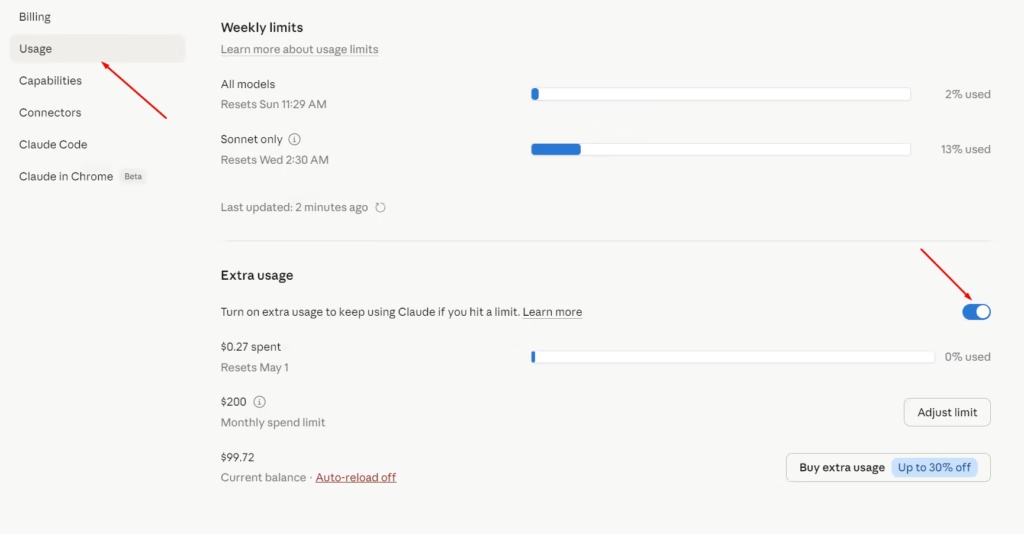
As long as you’re inside your normal Pro limits, nothing gets charged. The moment you hit your 5-hour or weekly wall, Claude doesn’t block you, it keeps running and bills the overage against your prepaid balance at standard token rates.
Sonnet burns slower, Opus burns faster. When you hit your monthly cap, it stops. Resets the 1st of the next month.
Anthropic sells those credit packs with up to 30% off depending on size, and you can turn auto-reload on or off. The whole thing works across web, desktop, mobile, and Claude Code under the same login.
Why this matters for solopreneurs. You’re not hitting limits every day. You hit them on heavy coding days, content sprints, or research marathons.
Instead of paying $80 more per month for Max 5x, you set a $20-30 Extra Usage cap and only spend it on the days you actually need the headroom.
Light week? You spend nothing on top of your $20 Pro. Heavy week? You spend an extra $15 and keep moving.
The only reason this stops making sense is if you’re regularly burning through $40+ in Extra Usage every month.
At that point, Max 5x at $100 is $80 more than Pro for roughly 5x the headroom, the flat rate starts winning.
Quick footnote for the automation crowd. Extra Usage is for the Claude app. If you’re calling Claude from n8n, Make, custom scripts, or your own MCP servers, that’s the Anthropic API, completely separate wallet, billed per-token at standard rates from platform.claude.com.
Same company, different lane. Don’t confuse the two.
And if your “automation” is more about feeding Claude your existing notes and project docs without copy-pasting, connecting Obsidian directly to Claude Code is the cleanest setup, your agent reads your vault as context without touching the API.
Max 5x at $100/Month: Who Actually Needs It
Max 5x gives you five times the usage limits of Pro. Roughly 225 messages per 5-hour window. It also prioritizes your requests during peak load, you get faster responses when the servers are busy.
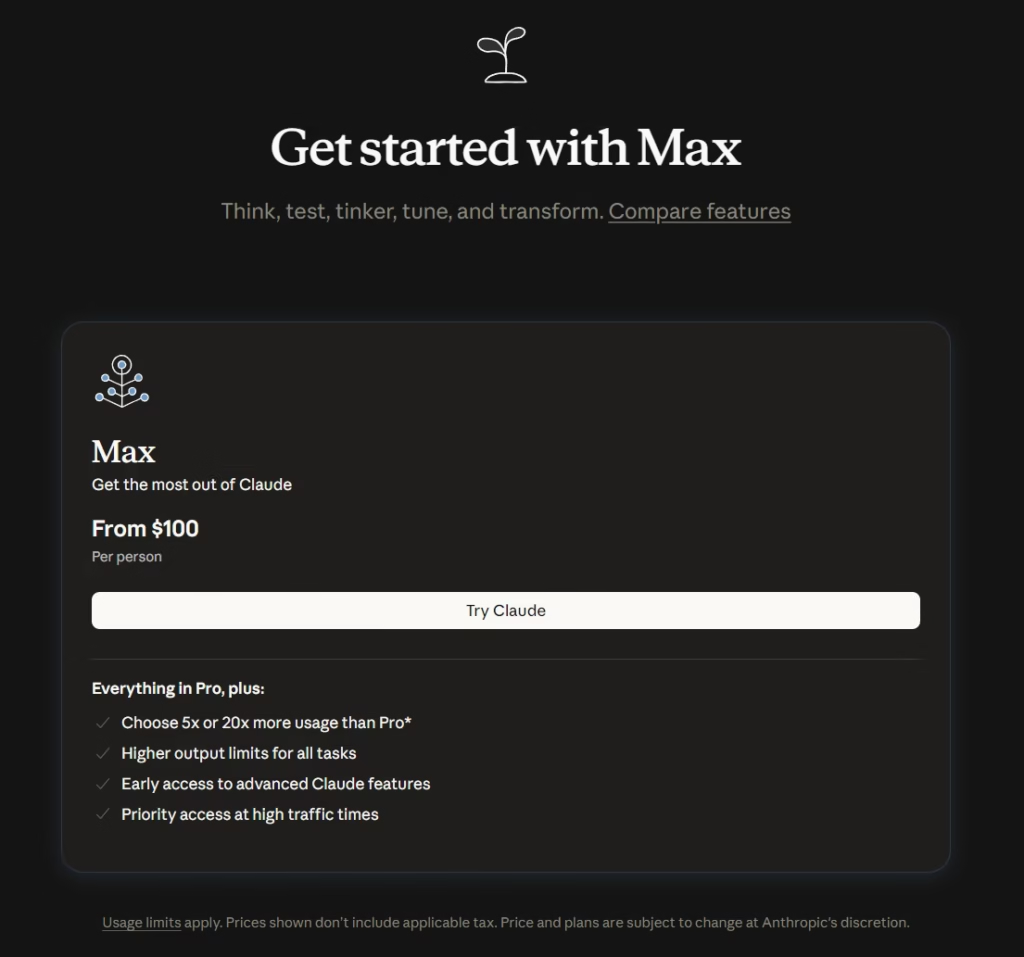
The honest answer for whether you need Max 5x… you should be able to feel it before you pay for it.
If you’re on Pro and you regularly hit the wall mid-session, not occasionally, but multiple times per week, and your Extra Usage is consistently running $40+/month, Max 5x is worth considering.
The math is you’re already paying $20 Pro + $40 Extra Usage = $60/month, and Max 5x is $100 for roughly 5x the baseline headroom and priority access during peak load.
That’s $40 more for a lot more ceiling and no credit-balance management.
Who this fits:
- Developers using Claude Code as their primary coding tool for 6-8 hours a day
- Operators running long research or content sessions daily
- Anyone building a product where Claude is doing heavy lifting across every workday
Who this doesn’t fit:
- Solopreneurs using Claude for a mix of tasks throughout the day (Pro and Extra Usage handles this)
- Writers and researchers who don’t hit the daily wall consistently
- Anyone who’s buying it “just in case”, that’s Pro money wasted
Max 20x at $200/Month: The Real Use Case
Max 20x is 20 times Pro usage. Around 900 messages per 5-hour window. It also includes priority access to Opus 4.6 specifically, meaning you get faster Opus responses even when demand is high.
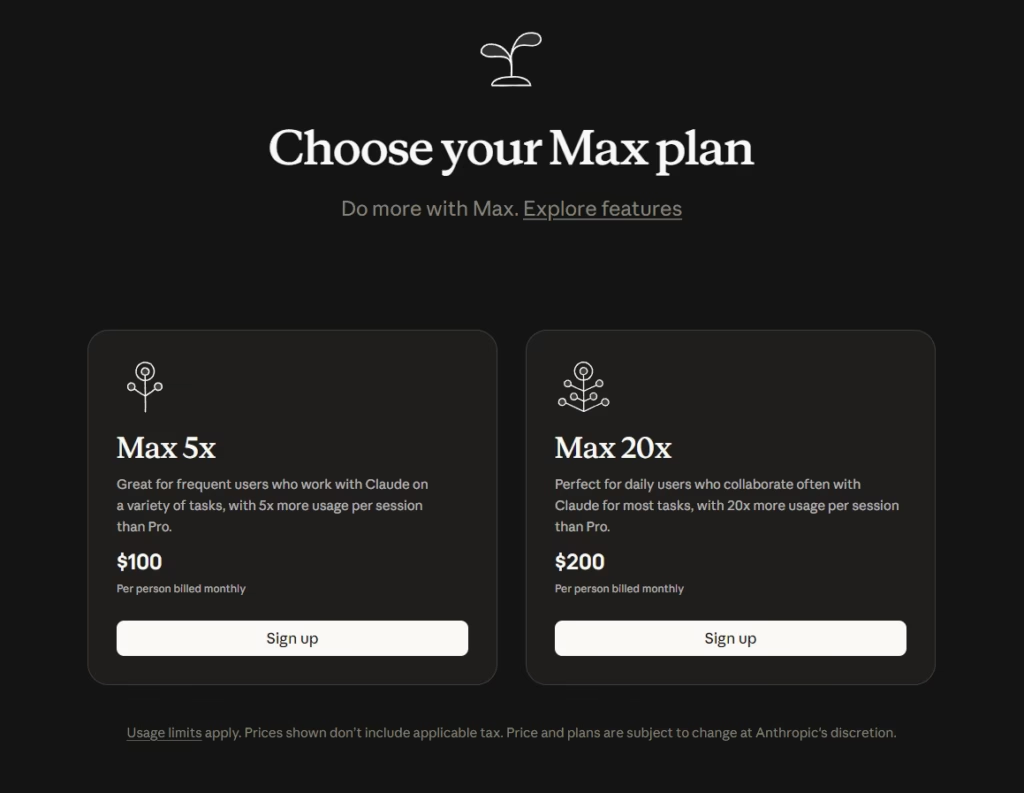
At $200/month, you need to be generating real output from Claude to justify it. This is the tier for:
- Full-time developers where Claude Code is their primary productivity tool
- Teams where one person is running Claude on behalf of others
- Anyone shipping production code every day and needing uninterrupted sessions
If you’re a solo operator doing content, marketing, automation, and occasional coding, Max 20x is almost certainly overkill. Pro with Extra Usage handles 95% of solopreneur workloads.
What Each Plan Unlocks — Full Feature Breakdown
| Feature | Free | Pro ($20) | Max 5x ($100) | Max 20x ($200) |
|---|---|---|---|---|
| Claude Sonnet 4.5 | Yes | Yes | Yes | Yes |
| Claude Sonnet 4.6 | No | Yes | Yes | Yes |
| Claude Opus 4.6 | No | Yes | Yes | Yes (priority) |
| Extended thinking | No | Yes | Yes | Yes |
| Projects (persistent context) | No | Yes | Yes | Yes |
| Claude Code (terminal, desktop, web) | No | Yes | Yes | Yes |
| Cowork tab | No | Yes | Yes | Yes |
| Computer use | No | Yes | Yes | Yes |
| Dispatch (phone to desktop) | No | Yes | Yes | Yes |
| 200K context window | Limited | Yes | Yes | Yes |
| Extra Usage (pay-as-you-go overage) | No | Yes | Yes | Yes |
| Approx. messages / 5hr window | ~10 | ~45 | ~225 | ~900 |
| Priority access during peak | No | No | Yes | Yes |
The Decision Framework
Stay on Free if: You’re still deciding whether Claude fits your workflow. Give it a week. If you’re hitting limits and finding it useful, that’s your signal.
Go Pro if: You’re using Claude daily for any combination of writing, research, coding, automation, or knowledge work. $20/month is a no-brainer at this point. Claude Code and Cowork alone are worth it.
Turn on Extra Usage instead of upgrading if: You’re on Pro and hitting limits a few times a week. Set a $20-30 monthly cap and let it cover the heavy days. This is the smarter move than jumping to Max for most solopreneurs.
Go Max 5x if: You’re hitting Pro limits daily, your Extra Usage is consistently running $40+/month, and you’re using Claude Code as your primary tool for 4+ hours a day.
Go Max 20x if: Max 5x isn’t enough. You’ll know because you’ll still be hitting walls.
Where to Go From Here
Most people overpay for Claude because they buy headroom they haven’t earned yet. They jump to Max 5x on day one because $100/month feels serious, then never touch most of what they’re paying for.
Don’t be that person. Start on Free for a week. Use it on real work, not toy prompts. The moment you’re working around the limits instead of with them, that’s your signal to go Pro.
Run Pro for a month. Toggle Extra Usage on with a $20 cap so a heavy day never blocks you mid-session. Watch what your actual usage looks like, not what you imagined it would look like.
After 30 days, you’ll have real data instead of a hunch. If you’re still hitting walls after that and your Extra Usage is consistently north of $40/month, then Max 5x makes sense. Not before.
The whole game is letting your actual workflow tell you what to upgrade, instead of paying for a future version of yourself that may never show up.
Pro plus Extra Usage handles 95% of solopreneurs. Build from there.
See you in the next one. PEACE ✌️
Frequently Asked Questions
About

Nick Chauhan
Web Developer & Founder Of PixelNThings
I build AI-powered systems that actually ship. Agents, automations, full-stack apps. Claude, Cursor, Gemini, MCP, n8n, Stitch etc.. Also design high-converting funnels and website on Systeme.io, WordPress & GoHighLevel. I post what I build.

