

I used to spend roughly four hours researching a single blog post. Pulling sources, cross-checking stats, hunting for angles that hadn’t been beaten to death by every other AI marketing newsletter. By the time I actually started writing, my brain was already cooked.
Now the same research takes me about 30 minutes and sometimes less. The output is sharper, the sources are fresher, and I haven’t lost the thing that made my writing mine in the first place.
The trick isn’t a fancier model. The trick is treating Claude Code like a junior researcher I’m managing, and giving it a workflow instead of just a vibe.
A Quick History of How We Got Here
Before I get into the workflow, I want to walk through how content research actually evolved over the last decade, because the answer to “why does this approach work” lives in that history.
Era 1: The Pre-AI Days (2015-2022)
If you were writing a serious article in 2018, the workflow looked something like this.
You opened a Google Doc, you ran a search for your topic and pulled the top ten results into separate browser tabs. You skimmed each one, took notes on what they covered, and started building a mental map of what was already out there.
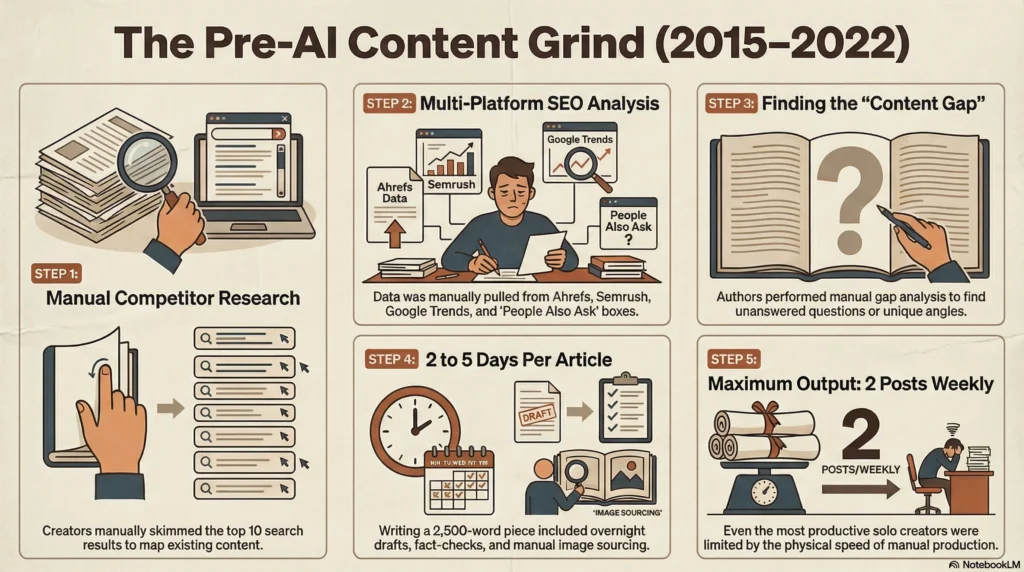
Then you went to Ahrefs or Semrush, plugged in your keyword, and pulled the keyword cluster, the search volume, the difficulty score, and the related questions people were asking.
You opened AnswerThePublic for question variants. You checked Google Trends to see if the topic was rising or falling. You looked at the People Also Ask boxes and the related searches at the bottom of the SERP.
After all that, you had to figure out what those ten existing articles missed. What angle hadn’t been written about yet, which questions weren’t being answered, which contrarian take was sitting there waiting for someone to claim it.
That gap analysis was the real work, and it was almost entirely manual.
Then you wrote, a serious 2,500 word article took two to five days, sometimes more if you had to schedule expert quotes or wait for original research to come back.
You’d write a draft, sit on it overnight, edit in the morning, do another fact-check pass, format for the CMS, source images, write meta tags, and finally publish.
That whole loop, from blank page to published, for a single piece. If you were a solo creator running a content site, you maybe published twice a week if you were lucky and had nothing else to do.
Era 2: The AI Copy-Paste Era (2023-2024)
Then ChatGPT showed up, and the workflow flipped overnight. Suddenly you could open a chat window, paste in your topic, and ask for an article. Five seconds later you had 1,500 words on the screen.
Most people, including me, immediately started doing the same dumb thing. Open ChatGPT in one tab, ask for an article, copy the output, paste it into WordPress, hit publish.
The articles were grammatically perfect and factually questionable, and they all sounded the exact same because every writer in the world was prompting the same model with the same vague instructions.
Even the people who tried to be smarter about it ended up playing what I started calling “PING-PONG WITH THE LLM.”
You’d open ChatGPT in one tab, you’d ask for an outline, you’d paste the outline into Notion or Docs.
Then you’d open Claude in another tab and ask it to expand section one, you’d copy that into Google Docs or Notion.
You’d open Gemini in a third tab and ask it to fact-check. You’d open Ahrefs in a fourth tab to verify keywords. You’d jump to Canva to make the cover image, then to your CMS to publish, then back to ChatGPT to write the social posts.
You were technically using AI, but you were spending the entire day moving information between fifteen different tabs. The AI was fast, but you were the bottleneck, and you were losing context every time you switched windows.
The “speed gain” from using AI was almost entirely eaten by the cognitive cost of being a human router between five different model UIs.
This is the era most people are still in. They have access to powerful models, but their workflow is still a sequence of copy-paste operations between a half dozen tools that don’t talk to each other.
Era 3: The Agentic Terminal Era (2025-Now)
Late 2024 and into 2025, something actually shifted. Tools like Claude Code matured to the point where the model wasn’t just sitting in a chat window anymore.
It was sitting inside your terminal, with direct access to your filesystem and your scripts out of the box, and, once you wire them up, to MCP servers that bridge it into Notion, Google Docs, Sheets, image generation, search APIs, and your CMS.
To be honest, none of those integrations are plug-and-play.
Each one is a config file, an API key, and ten to thirty minutes of setup the first time. The payoff is that once it’s wired, it stays wired, and you stop being the router between fifteen tabs.
You become the editor of one pipeline that already has your tools loaded.
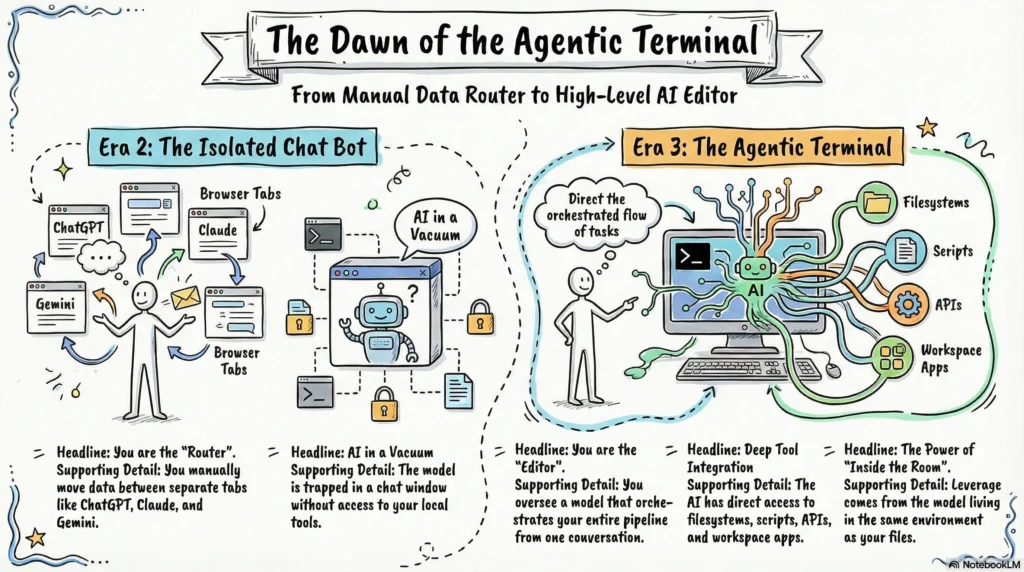
That is the shift. Not “AI got smarter,” because the underlying models are only marginally better than they were a year ago.
The shift is that the AI now lives in the same room as the rest of your tools, instead of sitting in a tab you have to keep tabbing into.
The workflow I’m about to describe only makes sense in that context. If you’re still in Era 2, opening separate tabs for ChatGPT and Claude and Gemini, the prompts will still work, but you won’t get the leverage.
The leverage comes from chaining them inside an environment where the model can also touch your files and your tools.
What Most People Get Wrong About AI Research
The default move is to open a chat window, type “research X for me,” and hope for the best. Yes, ChatGPT, Claude, and Gemini all have live web search built in now.
That isn’t the problem, but the problem is that a single lazy prompt only triggers a single shallow search, the model fires off 5 or 10 queries, grabs the first few results, and stitches them into a polished-sounding summary that reads exactly like what every other writer in your niche.
It looks good but it’s not that good. And if you publish it, your post sounds exactly like every other AI-written piece on the same topic, because every other writer is asking the same lazy question to the same models that are running the same shallow search.
That is the entire reason “AI SLOP” became a phrase.
The fix is not to write better single prompts. The fix is to break research into a real workflow with discrete steps, where each step forces a fresh search with a tighter scope, trending topics first, then angles, then a specific mix of source types, then verification.
Same model, same web search, completely different output. The leverage is in the structure, not the search button.
Think of it this way. If you hired a junior researcher and said “go research AI marketing trends for me,” they would probably spend three days reading random Medium posts and come back with something useless.
But if you said “go find ten trending topics in AI marketing from the last 48 hours, then pick three angles for each, then pull twelve verified sources for the angle I choose, then build me a brief,” you’d get something good. The difference is the workflow, not the researcher.
Claude is the junior researcher. The workflow is what makes the difference.
The Workflow I Actually Use
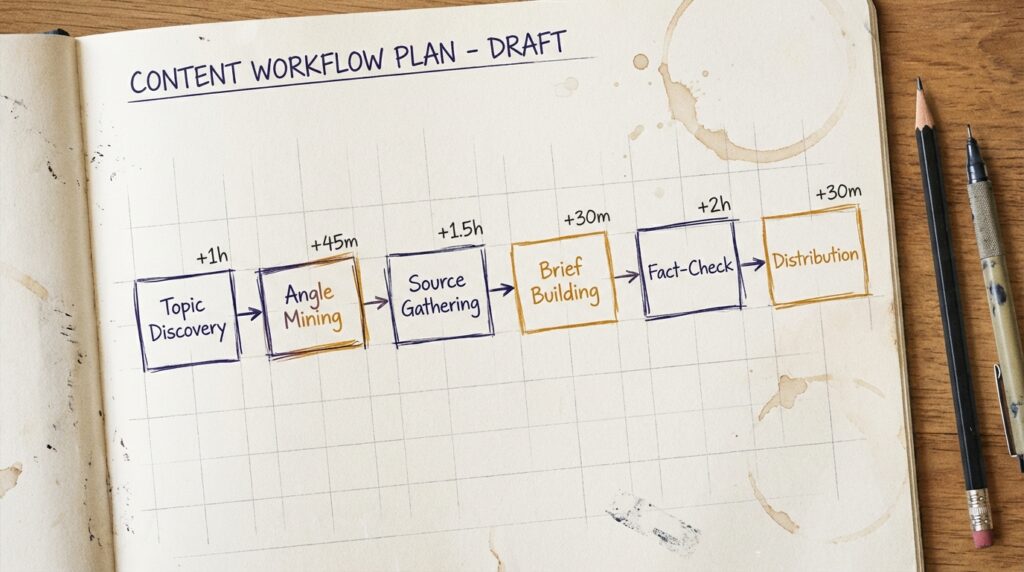
Every post I publish goes through the same six stages, in the same order.
Topic discovery, then angle mining, then source gathering, then brief building. I added two more stages for fact-checking and distribution because I kept embarrassing myself when I skipped them.
The whole thing looks like this.
WORKFLOW
[1] Topic Discovery   →   What is actually being talked about right now?
[2] Angle Mining      →   Which 3 angles have an audience and an unfair edge?
[3] Source Gathering  →   Pull 10-15 verified sources, not training data
[4] Brief Building    →   Turn it into a draftable outline with quotes
[5] Fact-Check Pass   →   Verify every number, name, date, and quote
[6] Distribution Cuts →   Repurpose for X, LinkedIn, video, comments
Most people SKIP STEP 1 AND STEP 3. That is exactly why their content sounds the same as everyone else’s, and why they keep getting caught making up statistics that don’t exist.
Why I Treat Each Step As Its Own Prompt
Claude is great at one job at a time. When you stack “find trending topics, pick the best one, write a brief, and fact-check it” into a single prompt, the model will do all four of them badly.
When you split them, each prompt has one job, the output of each step becomes the input to the next, and you can audit the work in between.
It also means I can stop and pivot. If the topics in step 1 are weak, I run it again with a different niche framing before I waste any energy on step 2.
If the sources in step 3 are thin, I know the angle is too narrow before I commit to a brief. If the brief in step 4 doesn’t excite me, I know not to waste a day writing the actual draft.
This is the same thing a senior editor does with a junior writer. Break the work down, hand off one piece at a time, check it before moving on. The model is happy to do bad work fast if you let it. Your job is to NOT LET IT.
Prompt 1: Topic Discovery
Use this when you need a fresh topic that hasn’t been written to death by every major outlet. I run it every Monday morning before I decide what to write that week.
PROMPT
You are a research assistant. Today's date is {TODAY}.

Using live web search, find the 10 most-discussed topics in {NICHE}
from the last 24-48 hours.

For each topic give me:
1. What happened (1 sentence)
2. Why people care (the emotional hook)
3. Source URL (must be from the last 48hrs)
4. Estimated audience size (small/medium/large)

Rules:
- No training data. Live search only.
- Skip anything already covered by 5+ major outlets.
- Prioritize topics where solo creators have an unfair angle.
That last rule is the one that changes everything. Most “trending topics” lists are useless to a solo creator because they surface the same stories every major outlet is already running.
You don’t want to be voice number 47 on the same news cycle. You want to find the story where you have an unfair advantage, and “unfair advantage” usually means I have personal proof, real numbers, or a contrarian take that the big outlets won’t publish.
Prompt 2: Angle Mining
Once you have a topic, the next question is what angle to take on it. This is where most writers go wrong, because they pick the most obvious framing, which is also the framing every other writer is going to pick.
PROMPT
Topic: {TOPIC}

Give me 5 distinct angles I could write about this. For each angle:

1. The hook (one-line headline that stops the scroll)
2. The audience (who specifically cares)
3. The contrarian take (what most people get wrong)
4. The proof I'd need (real data/example/case study)
5. Difficulty: easy / medium / hard to write

Rank them by 'unfair advantage' - which angle is hardest for a generic
writer to pull off?
The model will naturally surface the angles that require personal proof or contrarian framing, because those are the ones a generic AI writer literally cannot pull off. That gives you a list ranked by defensibility, not by how easy the angle is to write.
When I run this, I usually pick the top one or two angles that have actual proof I can bring, then drop the rest.
If none of the five angles excite me, I go back to step 1 and pick a different topic, because writing 2,500 words on a topic you don’t care about is the fastest way to publish boring content.
Prompt 3: Source Gathering
This is the step most people skip, and it’s the reason their AI-written content gets caught making up statistics.
The rule is simple. Every Claim in your final article needs a real source. Not a “the model said so” source. A live URL that you can click on.
PROMPT
Topic: {TOPIC}
Angle: {ANGLE}

Using live web search, find me 12-15 sources for this article. I need:

- 3 official docs / primary sources (highest authority)
- 4 reputable articles from the last 3 months
- 3 forum/Reddit/X discussions showing what real people think
- 2 contrarian sources (people who disagree)
- 1 case study or real number

For each: URL, date, 1-line summary, and a pull-quote I could use.

Reject anything older than 3-6 months unless it's a primary source.
The mix of source types really matters why because three official docs gives you authority, four recent articles give you “what people in the industry are saying right now.”
Three forum discussions give you actual human sentiment, which is the thing that’s missing from 99% of AI-written content.
Two contrarian sources keep you from writing a one-sided puff piece. One case study or real number gives you the proof the angle promised.
If the model can’t find the full mix, that’s important information.
If you can’t find three official docs, your topic might be too niche or too speculative. If you can’t find recent articles, the topic might already be cold.
If you can’t find contrarian voices, you’re probably about to write the same hot take everyone else is writing.
Prompt 4: Brief Builder
Now you have a topic, an angle, and a stack of sources. The next job is to turn that into a brief you could actually hand to a writer. This is the prompt I run on Sunday nights so I have a brief sitting on my desk Monday morning.
PROMPT
Topic: {TOPIC}
Angle: {ANGLE}
Sources: {PASTE_SOURCES}

Build me a content brief with:

1. The headline (3 options, scroll-stopping)
2. The hook paragraph (50 words max - make me want to keep reading)
3. The thesis (1 sentence - what's the ONE thing this post proves?)
4. The outline (H2s and H3s)
5. Key quotes/stats I should use (with source URLs)
6. The CTA (what do I want the reader to do next?)

Write it like a brief I'd hand to a writer. Specific, opinionated,
no hedging.
The “specific, opinionated, no hedging” line is the one that prevents the model from defaulting to fence-sitting brief output.
If you don’t tell the model to take a position, it will produce a brief that says “explore both sides” and “consider various perspectives,” which is useless to a writer.
You want a brief that says “the thesis is X, the proof is Y, the call to action is Z,” and the writer’s job is to dress that in good prose.
Prompt 5: Verification Pass
You wrote the draft. You’re proud of it. Before you publish, you run this.
ALWAYS. EVERY SINGLE TIME.
I learned this the hard way after publishing a post that confidently quoted a statistic that turned out to be made up by the model, whose knowledge was cut off in 2023.
PROMPT
Fact-check this draft. For every claim that includes:
- A number or statistic
- A product name or pricing
- A date
- A direct quote
- A 'study shows' or 'research says'

Go to the live web. Verify the claim. Report:
- Verified (source URL)
- Partially correct (what's wrong + corrected version)
- Cannot verify (remove or rewrite)

Draft:
{PASTE_DRAFT}
This prompt has saved me from at least three embarrassing fact errors in the last 2 months. The pattern is always the same.
I wrote the draft fast, the model helpfully filled in a number that “felt right,” and the verification pass caught it before I hit publish.
Without this step, you will eventually publish a wrong statistic, and someone will screenshot it, and that screenshot will outlive any apology you post.
The worst part is that you cannot trust your own memory of where you read something. You have to actually re-verify every claim. The verification pass is NON-NEGOTIABLE.
Prompt 6: Distribution Cuts
The post is fact-checked. It’s ready to publish, but the post on its own is maybe 30% of the total reach you can get from the work.
The other 70% is in the distribution cuts, the social posts, the threads, the videos, the comments you leave on related discussions to seed traffic.
PROMPT
Here's my blog post: {PASTE_DRAFT}

Give me:
1. 3 X/Twitter threads (each 7-10 tweets, with the hook tweet first)
2. 1 LinkedIn post (300 words, no emojis, ends with a question)
3. 1 short-form video script (60 seconds, hook in first 3 seconds)
4. 5 reply-guy comments I could leave on related posts to seed traffic

Don't summarize the post. Pull the SHARPEST insights and rewrite them
for each platform's culture.
If you ask the model to “create social posts from this blog post,” you get five versions of the same boring summary.
If you ask it to pull the sharpest insights and rewrite them in each platform’s native culture, you get content that actually performs on each platform, because each platform has its own rhythm and the same sentence does not work in all of them.
I run this once per published post and schedule the outputs across the next two weeks. One post becomes a week’s worth of social, plus seeding comments, all from a single research session.
Stop Copy-Pasting the Prompts
There are six prompts. You can absolutely just open Claude.ai, copy each one, paste in the variables, and run them by hand. That works.
I did it that way for about two weeks before I got tired of remembering which step I was on and where I’d put the output of the previous step.
So I packaged the whole workflow into a Claude skill. A Claude skill is a small file that lives in your ~/.claude/skills/ folder.
Once Claude Code knows the skill exists, you can talk to it naturally. You say “research a blog post about AI search trends,” and Claude pulls the right prompt automatically, fills in the variables, runs the search, and hands you back structured output.
No need to copy-paste or remembering which step you’re on.
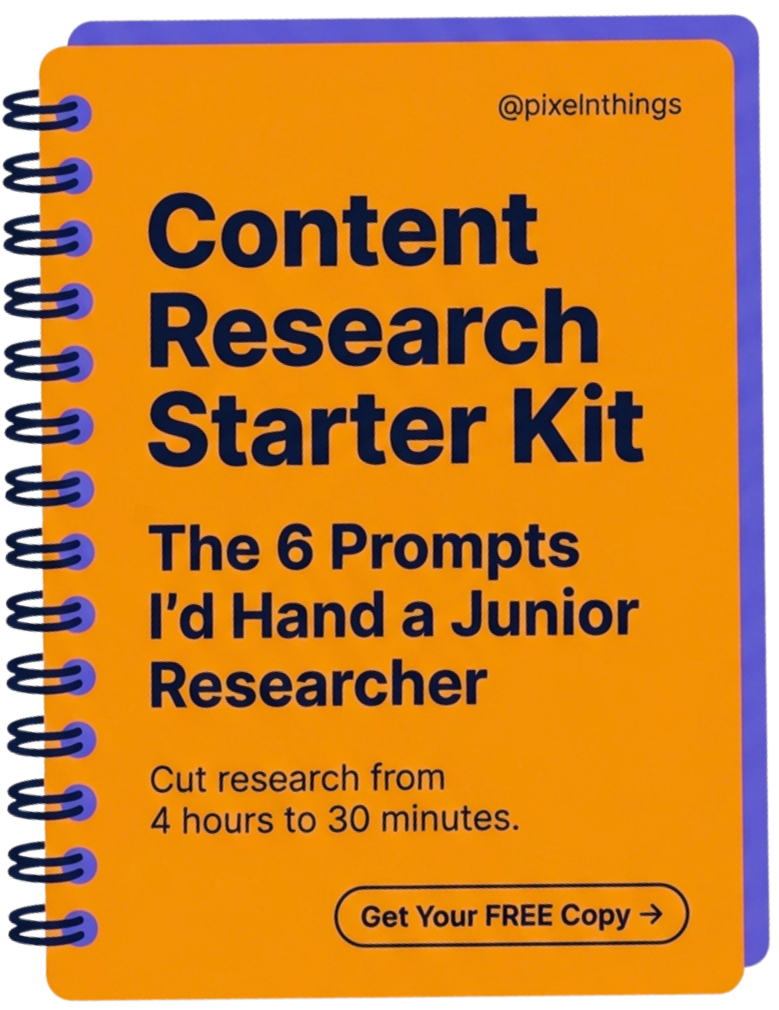
I bundled the lite version of this skill into a free starter kit. It includes the full SKILL.md file with all six prompts, plus a one-page install guide that takes about thirty seconds to set up.
You drop the folder into ~/.claude/skills/, restart Claude Code, and start asking for research the way you’d ask a junior teammate.
The whole thing is free. You can grab it below 👇
Steal My 6-Prompt Content System + Claude Skill
Six prompts. One Claude skill. Thirty-second install. I’ll send it to your inbox right now, along with the occasional note on what’s working in my content stack.
What Actually Changes When You Use It
I want to be clear about what changes and what doesn’t.
What changes is the time. Going from 4 hours to 30 minutes per post is real, and it compounds. If you publish twice a week, that’s seven hours back every week.
Over a year, that’s 364 hours, 9 full work weeks you get back to spend on the parts of the job that actually need a human, like writing, refining your taste, talking to your audience, building actual products.
What also changes is the consistency, because every post goes through the same workflow, the floor of my research quality went up.
I no longer have a “good day vs bad day” gap where some posts are well-sourced and others are vibes-based. The workflow forces a minimum standard, and that minimum is higher than what I used to produce on an average day.
What also changes is the breadth of sources. When I was doing this manually, I’d run out of patience after five or six sources and call it good.
The workflow makes me pull twelve to fifteen sources every time, and the extra few always surface something I would have missed. That extra context is usually what turns a forgettable post into a sharp one.
What doesn’t change is the HUMAN IN THE LOOP, and this is the part most “automate everything” creators get wrong, so I want to be careful here.
I do automate. I automate the full pipeline, from topic discovery to research to draft to image generation to WordPress publish.
My system can technically take a topic and push a finished post live without me touching a key, BUT I NEVER LET IT.
There is a real difference between automating blindly and automating with judgment, and that difference is the entire reason my content still sounds like me instead of like every other AI newsletter on the timeline.
Here is what happen behind the scene, Claude runs the six prompts. It hands me a brief, a draft, a fact-check pass, and a stack of distribution cuts.
Then I sit down and I read every line. I rewrite the openings the model got wrong. I cut the sentences that sound like a model wrote them.
I add the personal stories and the specific numbers and the contrarian asides that the model would never come up with on its own, because it doesn’t have my inbox or my customer calls or my embarrassing publishing failures from last quarter.
The same goes for the visuals. AI can absolutely generate real images based on your data, not just stock-looking placeholders, but cover art, diagrams, and infographics built from the actual numbers in your post.
And if you point it at a URL or a screenshot you took yourself, it can pull that in too. But you still have to be the one deciding which image, which screenshot, which short clip earns its place in the post.
The model will happily fill every section with a generated image if you let it. Your job is to NOT LET IT.
That is the loop. AI DOES THE WORK. YOU DO THE TASTE. You’re not writing every sentence from scratch like a maniac with no time, that’s the old model and it doesn’t scale.
But you’re also not letting the pipeline ship a post you haven’t read, edited, and signed off on. The automation is real. The judgment is non-negotiable.
If you skip the judgment step, you slowly lose your voice, and once you lose your voice your audience stops being able to tell you apart from any other AI marketing newsletter.
That is the slow death of every solo content brand that tries to “automate everything.” The workflow I’m describing automates the grunt work, the research, the sourcing, the first-pass drafting, the image generation, the publishing mechanics.
It does not automate the part where a human decides whether the post is actually good enough to ship.
What This Costs and Where It Breaks
I’d be lying if I said this workflow was free or foolproof. It isn’t. Here’s what one finished article actually costs me end-to-end.
My setup, not API tokens. I’m not paying per-token for the writing. I run CLAUDE OPUS 4.6 inside Claude Code on a CLAUDE MAX subscription ($100/month, flat).
Opus is the brain that orchestrates the workflow, runs the prompts, and writes the actual draft. Max gives me effectively unlimited Opus sessions for normal solo-creator volume, I have never personally hit the rolling cap doing 3 to 5 posts a week.
So the writing itself is $0 in marginal cost per post. It’s a flat subscription.
Where the per-post cost actually shows up is in the tools Opus calls during research and image generation. None of those run on my Claude subscription, they’re separate pay-as-you-go APIs and metered services.
Here’s what one finished post actually costs me, pulled from the cost-tracking logs my MCP server writes after every job:
| Step | Tool | Cost |
|---|---|---|
| Research + verification | Content Research MCP (standard tier) | ~$0.15 |
| Targeted scrapes | Firecrawl (~10 credits) | ~$0.32 |
| Cover + 2 in-body images | Gemini image APIs (Nano Banana family) | ~$0.21 |
| Writing + orchestration | Claude Opus 4.6 on Max plan | $0 marginal |
| Per-post total | ~$0.68 |
A few notes on the table. The MCP server runs in three tiers, quick (~$0.05), standard (~$0.15), and premium deep research ($3–$7), and I default to standard.
Premium only fires for cornerstone pillar posts where source depth is the entire point, which pushes the per-post total to roughly $3.50–$8.
Firecrawl bills in CREDITS, not dollars (1 credit per scrape, 3,000 credits/month on the $19 Hobby plan), so the $0.32 line is credit value, not a per-call charge.
And the image cost assumes one cover plus two in-body images on a mix of Nano Banana Pro and Flash, your number will vary if you use 4K or batch mode.
The monthly framing.
Call it roughly seventy cents per regular post in metered usage, sitting on top of three flat subscriptions: Claude Max ($100/mo, covers all orchestration and writing), Firecrawl Hobby ($19/mo, 3000 credits), and Gemini image API (pay-as-you-go, billed monthly).
If I publish twice a week (8 posts/month), the whole stack lands at roughly $120–150/month for research, verification, scraping, images, drafting, the complete pipeline.
If you hire a pro today to handle 5,000 words, deep research, and custom images, you’re looking at $300+ per post. The math is not subtle.
I’m not counting hosting, Notion, or Google Workspace, because those exist whether or not I use Claude Code. The numbers above are only the AI-specific spend that wouldn’t exist if I went back to writing by hand.
Where the workflow breaks. Live web search is not magic. Three failure modes I’ve hit repeatedly:
- Garbage sources sneak in. The model will sometimes pull a low-authority blog farm, an SEO-spam page, or an AI-generated article into the source list and not flag it. The fix is to actually click the URLs in step 3 before you trust them.
- Verification misses paraphrased claims. The fact-check pass is good at catching numbers, dates, and direct quotes. It is bad at catching subtle reframing’s, when the model paraphrased a source’s claim into something stronger than the source actually said. You still have to read the verification report and spot-check the interpretation, not just the citation.
- Hallucination doesn’t fully die with search on. Even with web search enabled, the model can still invent a statistic or attribute a quote to the wrong person if the search results are thin. The verification pass catches most of this, but not all. Assume one in twenty claims is wrong until you’ve personally verified it.
The workflow makes research FAR BETTER, not perfect. If you treat the output as a starting brief that still needs a human gut-check, you’re fine.
If you treat it as a finished product you can publish without reading, you’re going to embarrass yourself eventually. I’ve done both. Only one of them ends well.
Why Claude Code Specifically
A lot of people will read this and think I could just do all of this in ChatGPT or Claude.ai. You can, and the prompts will work just fine in either of those. The reason I use Claude Code specifically is that it lives in my filesystem.
It can read the markdown drafts I’m working on, run scripts, and chain skills together with other things in my pipeline. When I’m done researching, Claude Code can hand the brief directly to my draft file, then to my image generation script, then to my WordPress publisher, all in one conversation.
That kind of pipeline is hard to build inside a chat interface that can’t touch your files.
This is the Era 3 advantage I was talking about earlier. The model in your terminal is not the same product as the model in your browser tab, even if it’s the same underlying weights.
The terminal version can CHAIN. The browser version can only CHAT.
If you’re already using Claude.ai and not Claude Code, the lite skill still works. You drop the SKILL.md content into a Claude.ai Project’s instructions, and every conversation in that project has the workflow loaded. You lose the file integration, but you keep the prompts. That’s a fine starting point.
The Limitation of the Free Kit
The lite version is the manual version. You ask, Claude runs the prompt, you get the output, you move to the next step.
It works really well for someone running a single content brand. It is also still slower than what I run on my own machine for my own publishing.
The version I actually use is a custom MCP server that runs all six prompts as background jobs. I kick off a research task, walk away to design a cover image, come back ten minutes later, and there’s a fully verified brief sitting in my docs folder with cost tracking, source citations, and a fact-check pass already done.
The MCP server has three tiers, from a five cent quick research run all the way up to a deep research run that costs a few dollars but produces something close to what a paid research firm would give you.
That MCP server is part of the AI Content OS pack (Premium), which also includes the WordPress publisher skill and the image designer skill that handle the rest of my pipeline.
The full premium version kit is officially dropping in just 3-4 days. If you want to be the first to get your hands on it, join the list below.
The free kit alone will already change the way you research, so start there, but if you’re ready for the full upgrade, stay tuned. It’s coming fast.
Steal My 6-Prompt Content System + Claude Skill
Six prompts. One Claude skill. Thirty-second install. I’ll send it to your inbox right now, along with the occasional note on what’s working in my content stack.
Where to Start
Start with the free kit. Install the skill, run the topic discovery prompt this, and pick one post idea where you have an unfair edge.
Then move through the workflow one step at a time. The first post you research this way will take maybe 30 minutes instead of four hours, and you’ll see the difference in the writing immediately.
You don’t need a fancier model, you don’t need to wait for AGI, you don’t need to subscribe to seventeen different AI tools.
You need a workflow, you need to stop pretending that one giant prompt can do the job of six small ones, and you need to move from copy-pasting between tabs to running everything in one place where the model can actually help you.
About

Nick Chauhan
Web Developer & Founder Of PixelNThings
I build AI-powered systems that actually ship. Agents, automations, full-stack apps. Claude, Cursor, Gemini, MCP, n8n, Stitch etc.. Also design high-converting funnels and website on Systeme.io, WordPress & GoHighLevel. I post what I build.

