

Look, I’m not going to sit here and pretend I just discovered these three tools last week and now I have “thoughts.”
I use GHL every single day. I’ve built workflows in n8n that would make a flowchart cry. I’ve used Make enough to know exactly when it’s the right call and when it’s going to nickel-and-dime you into switching anyway.
And the conversation happening right now in every GHL Facebook group, every n8n Discord, every Reddit thread is the same one:
“Should I use GHL workflows or move to n8n?” “Is Make worth it or should I just learn n8n?” “Can GHL handle everything or am I being delusional?”
But here’s what most of those threads are missing…
The question itself is WRONG.
It was never “which tool is best.” It’s which tool should handle which job. Because asking GoHighLevel to do what n8n does is like asking your accountant to also be your personal trainer. Sure, maybe they could try, but why would you do that to yourself?
This post is the answer I wish someone gave me two years ago. No affiliate links for any of these platforms. No “it depends” cop-outs. Just a straight breakdown from someone who’s actually deep in all three.
Why “All-in-One” Sounds Better Than It Actually Is
I get the appeal. Seriously, I do.
ONE dashboard.
ONE login.
ONE invoice.
It looks clean. It feels simple. It’s beautiful on paper, but it’s a trap.
And for agencies under 10 clients doing standard lead gen and follow-up? Yeah, GHL alone is genuinely enough. I’m not going to pretend otherwise just to make this article longer.
But here’s what happens at client 15, or client 20, or the moment you try to do anything slightly creative with your automation.
You start building workarounds.
A workflow that triggers another workflow that triggers a webhook that triggers… what exactly? 🤔
Nobody remembers. You built it three months ago and now it’s load-bearing infrastructure that nobody wants to touch.
If you’re nodding your head right now, you know exactly what I mean😅
The real problem isn’t that GHL is weak. The real problem is that agencies keep asking their CRM to also be their:
- Data pipeline
- AI orchestration engine
- Internal operations dashboard
- Team notification system
- Commission calculator
- System health monitor
That isn’t a CRM anymore, it’s a fragmented architecture that’s lost its original purpose.
The agencies I see doing well have stopped thinking in terms of “one tool to rule them all” and started thinking about TWO jobs…
Job 1: Where does customer data live and where do client-facing workflows run? That’s GHL. That’s always GHL. Nothing in this article changes that.
Job 2: Where does the behind-the-scenes logic run? The routing, the enrichment, the cross-app coordination, the AI reasoning, the internal alerts. THAT is where Make or n8n come in.
Two jobs. Two layers. That’s the whole framework. Everything else in this article is just details.
Wait 🤔 What Are These Tools, Exactly?
If you already know what GHL, Make, and n8n do, skip ahead. This is for the person who keeps hearing these names and has no idea why people argue about them online.
GoHighLevel (GHL)
GoHighLevel is an all-in-one CRM and marketing platform built for agencies. It handles contacts, pipelines, email, SMS, phone calls, funnels, booking calendars, reputation management, and now a full AI stack including voice agents and AI chatbots.
Think of it as the front office of your agency. Everything that touches the customer, lead capture, follow-up, scheduling, communication, lives here.
Make (formerly Integromat)
Make is a cloud-based automation platform that connects apps together visually. You drag modules onto a canvas, wire them up, and data flows between tools automatically.
Think of it as the translator between your apps. GHL doesn’t talk to Airtable natively? Make bridges that gap. Need to push data from a form to a Google Sheet to Slack? Make handles it without code.
It’s fast to set up, non-technical friendly, and has 3,000+ pre-built app connections. The trade-off is a credit-based pricing model that can get expensive at volume.
n8n
n8n is an open-source workflow automation platform built for developers and technical teams. It connects apps, processes data, runs logic, and, this is the big one, can be self-hosted for free with unlimited executions.
Think of it as the engine room. It handles the complex backend logic, AI orchestration, data transformation, and cross-system coordination that neither GHL nor Make were designed for.
The trade-off is a steeper learning curve. If you’re comfortable with data structures and logic, it’ll feel natural. If the word “JSON” makes you nervous, you’ll want help.
Now that we’re all on the same page, let’s compare them properly.
GoHighLevel vs Make vs n8n: The Comparison
Every comparison table you’ve seen for these tools was written by someone selling one of them. So here’s mine. No punches pulled.
| Feature | GoHighLevel | Make | n8n |
|---|---|---|---|
| Best for | CRM, pipelines, SMS/email, client-facing AI | Fast app-to-app connections, non-technical teams | Complex logic, AI agents, high-volume backends |
| Skill level | Low-Medium | Low-Medium | Medium-High (be honest with yourself here) |
| Flexibility | High inside CRM scope. Outside that? Limited. | Good for standard stuff. Ceiling shows up fast. | Basically unlimited if you can handle it 😉 |
| AI workflow depth | Solid native stack (Voice AI, Conversation AI, Agent Studio etc.) | Capable for classification, routing, RAG retrieval. Ceiling at deep orchestration. | Deep. LangChain, RAG, vector stores, multi-agent, the works |
| CRM strength | 💪 This is the whole point | ❌ None | ❌ None |
| App integrations | Limited native. Webhooks fill some gaps | 3,000+ pre-built modules | 500+ native + 600+ community + literally any REST API |
| Pricing model | Flat sub ($97–$497/mo) + usage fees for SMS, AI, calls | Per-credit. Every. Single. Step. Costs. A. Credit. | Per-execution. 50-step workflow = same price as 2-step |
| Scaling impact | Sub stays flat, usage fees grow predictably | Bill goes up. Fast. Especially with polling triggers | Self-hosted? Bill stays the same. Forever. |
| Self-hosting | Nope | Nope | Yes. Free. Unlimited. |
| VA Friendly? | Yes | Probably yes | Probably not without training |
I want to be extra clear about that pricing row because it’s where most people get burned.
Updated Pricing as of March 2026
| Plan Tier | Make (Cloud) | n8n (Cloud) | n8n (Self-Hosted) |
|---|---|---|---|
| Free | $0 (1,000 credits/mo) | €0 (trial only, no permanent free tier) | $0 (Community Edition, unlimited) |
| Entry | ~$9/mo (5,000 credits) | ~€24/mo (2,500 executions) | $0 + VPS (~$5–20/mo) |
| Standard | ~$16/mo (10,000 credits) | ~€55/mo (5,000 executions) | $0 + VPS cost |
| Business/Teams | ~$29–34+/mo (Teams features) | ~€120–800+/mo (Scaling tiers) | Custom (Enterprise license) |
The critical difference: Make counts every step. n8n counts every run. A 10-step workflow running once = 10 Make credits but only 1 n8n execution. That gap compounds really fast.
Where GoHighLevel Wins
The CRM. Period.
Neither Make nor n8n have a CRM. They don’t have pipelines. They don’t have contact records. They don’t have booking calendars, reputation management, funnel builders, or SMS/email sequencing.
Trying to compare them as “competitors” to GHL is like comparing a kitchen to a delivery truck. They do different things.
GHL’s sub-account architecture alone makes it the default for agencies. Every client gets an isolated workspace. Contacts, automations, pipelines, reporting, all separated, all managed from one agency dashboard. That’s not something you can recreate in n8n with a few workflows and good intentions.
The Native AI Stack Is Actually Good Now
I know a lot of agency owners who still think GHL’s AI is the basic chatbot from 2023. It’s not.
In 2026, you’re working with…
- Conversation AI across SMS, Facebook, Instagram, web chat, live chat, with upgraded knowledge sources that support tables, rich text, files, and re-ranking
- Voice AI with actual agent logic built in Agent Studio
- AI Decision Maker for routing contacts without building massive if/then trees
- AI Intent Detection for sentiment-based branching (POSITIVE, NEGATIVE, NONE)
- Conversation AI API for programmatic control
- Ask AI thing of GPT wrapper, instead of navigating through dozens of menus, you simply “Ask AI” the assistant to perform tasks for you.
For standard agency use cases, answering questions, booking appointments, qualifying leads, following a script, this native stack handles it without bolting anything external on top.
I’m not saying this because I’m a GHL fanboy. I’m saying it because too many people are overcomplicating their setups with external AI when the native tools would’ve been fine.
Where GHL Hits Its Ceiling
Two areas, and both are predictable…
Anything that needs to cross systems.
The moment your workflow touches a tool GHL doesn’t natively support, and there are A LOT of those, you’re in webhook-and-pray territory.
It works for simple payloads. It becomes a nightmare when you need data transformation, error handling, retries, or multi-step processing across three or four apps.
Anything your team needs that isn’t client-facing
Internal dashboards, formatted team alerts, commission tracking, system health monitoring, cross-account reporting, none of this is GHL’s strength. You can hack it together with custom fields and workflows. You’ll hate maintaining it.
Where Make Wins (And Where It’ll Quietly Drain Your Wallet)
Speed to First Automation: Unmatched
I’ll give Make this, when you need to connect App A to App B and you need it done in 20 minutes, Make is the fastest path from “I need this” to “it’s running.”
The visual builder is intuitive. 3,000+ pre-built modules mean you’re rarely building a connection from scratch. Authentication flows are simplified. Your non-technical team member can probably figure it out.
For small agencies that need a handful of external connections, sync new GHL contacts to a Google Sheet, send a Slack message when a deal closes, push data to Airtable, Make is the path of least resistance.
Nobody on the n8n side of the fence likes to admit.
If you’re a 5-person agency billing $10–15K a month and you need a GHL-to-Airtable sync running by Friday, spending an extra $30–50/month on Make credits to skip 15–20 hours of n8n setup isn’t a bad trade.
It’s actually the smart one. The credit math matters when you’re running 30 scenarios across 20 clients. It doesn’t matter when you need three connections and your time is worth more than optimizing your automation bill.
Know which stage you’re actually in before you optimize for a problem you don’t have yet.
The Credit Math That Nobody Explains Until You’re Already Paying
Here’s where I need you to pay attention because this is the part Make’s marketing doesn’t put in bold.
Make charges per credit. Each module (step) in your scenario that processes data = at least 1 credit.
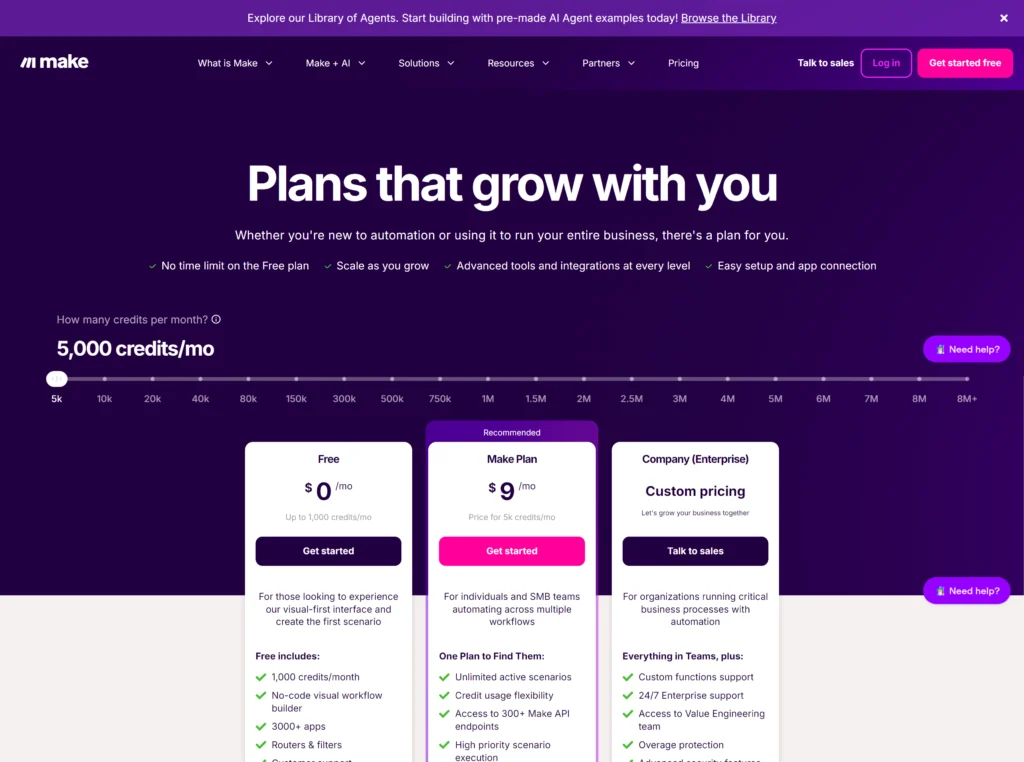
(more accurately… most modules consume credits, but how many depends on the module type and how many bundles get processed.)
So a scenario with 10 steps, running once = 10 credits consumed.
That same scenario running 500 times a month = 5,000 credits.
The entry-level paid plan gives you 5,000 credits for ~$9/month. The “Make Plan“ at $16/month bumps you to 10,000. Sounds generous right?
Now let’s say you set up a scenario to check for new GHL contacts every 5 minutes. That’s a polling trigger. Even when there’s nothing new to process, that trigger fires and eats a credit.
(yes, even when nothing happens. You’re paying for the check, not just the result)
12 checks per hour × 24 hours = 288 credits PER DAY. Just… checking. Not doing anything. Just looking 👀
That’s 8,640 credits per month on ONE scenario that might only actually process data a few times a day.
On the $9 plan? You’re done. That’s 173% of your monthly credits gone. On the $16 plan? That single polling trigger just ate 86% of your allowance.
Now add a couple more scenarios. Add some branching, add an AI module (which can consume MULTIPLE credits per action depending on tokens, bundles, or iterations), and you’re upgrading, and then upgrading again.
(and if you’re using iterators or processing arrays, one “run” can quietly turn into 10, 50, or 100+ credits without you realizing it.)
Make also introduced higher pricing on overage credits as of recent plan changes. So going over your limit doesn’t just cost more, it costs more than the credits included in your plan.
(In simple translation… inefficiency gets punished twice 😬)
I’m not anti-Make. I use it for specific things. But you need to go in with open eyes about how the billing works, because the sticker price and the actual price can be very different animals.
Where Make Runs Out of Room
AI depth…
Make launched AI agents in April 2025 and has kept shipping since.
Credit where it’s due, they now support RAG-style knowledge retrieval, uploaded files get chunked, vectorized, and semantically searched, plus thread IDs for conversation continuity and context management for creating, updating, and retrieving agent context. That’s real progress.👏
But here’s the gap… their agents still live inside Make’s scenario ecosystem rather than acting like a fully independent agent platform.
The tool-use and reasoning capabilities are visible and functional for classification, routing, and templated responses, but if you need deep multi-step orchestration, more custom memory architecture, or fully flexible vector/database control, you’re going to feel the ceiling.
Make’s AI is good enough for “classify this, route that, generate a response.” It’s not really built for “reason through this problem across five systems and decide what to do next.”
That’s not a knock. For most agency use cases, Make’s AI covers the job. Just know where the line is before you build past it.
Complex logic
Making branches converge back into a single path isn’t straightforward. Error handling exists but takes more configuration than it should.
For linear automations, Make is great. For anything with serious conditional logic, you start feeling the constraints.
Make is fantastic for getting automations live fast. It is not fantastic at staying cheap when your scenarios are chatty, polling-heavy, bundle-heavy, or AI-hungry.
Where n8n Wins (And Why Your Developer Friend Won’t Shut Up About It)
The Pricing Model That Actually Makes Sense at Scale
This is the big one and I need to say it clearly because the difference is fundamental.
n8n charges per execution. One execution = one complete workflow run, regardless of how many steps are in it.
A workflow with 3 steps that runs once = 1 execution. A workflow with 50 steps that runs once = 1 execution.
Same price. The complexity of your workflow doesn’t change your bill.
Let me put that in context with a direct comparison.
A 10-step workflow running 1,000 times per month…
- Make: 10,000 credits consumed
- n8n: 1,000 executions consumed
Same work. Same output. Fundamentally different bill.
And if you self-host n8n? Zero execution limits. The Community Edition is free. You pay for the server (typically $5–20+/month on DigitalOcean, Hostinger or Hetzner) and that’s it. Run 100 workflows, run 100,000 executions. The bill doesn’t change.
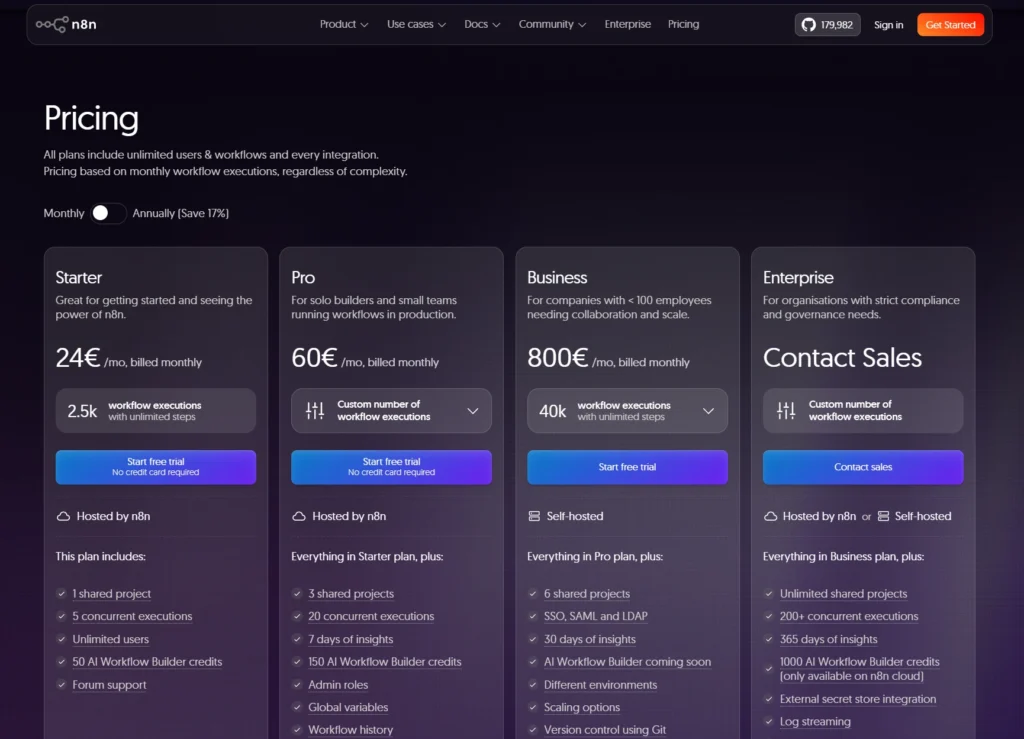
Cloud plans start at €24/month for 2,500 executions (Starter) and €60/month for 10,000 executions (Pro). But honestly, at those prices, self-hosting makes the cloud plans look silly if you have even basic server skills.
I’ve talked to agencies running 50,000+ monthly executions on a self-hosted n8n instance that costs them $15/month. On Make, that same volume would cost hundreds. On Zapier, it would cost thousands.
The AI Capabilities Are Legitimately Ahead
This isn’t hype. n8n has built AI as a core architectural layer, not a bolt-on.
What you get natively:
- AI Agent nodes that use LLMs to decide which tools to call at runtime
- LangChain integration for chains, memory, vector stores, retrievers, and RAG workflows
- Model flexibility OpenAI, Anthropic, Mistral, Google Gemini, Ollama (self-hosted), plus Groq, AWS Bedrock, Azure OpenAI, Cohere, DeepSeek, and more.
- Memory nodes for storing conversation history, including Redis, Postgres, Motorhead, Xata, and more
- Tool-use routing so an AI agent can choose between APIs, databases, app actions, and other workflow tools based on the task
Make’s AI is better than that now. It can handle more than simple prompt-response flows.
But n8n gives you a different level of control. You can build agents that chain tool use across multiple steps at runtime, retrieve context from custom vector databases, maintain memory across sessions with the right backend, and orchestrate actions across systems using the tools you expose to the agent instead of hardcoding one fixed path every time.
That’s a deeper level of agent architecture.
If your agency is building AI services for clients, or using AI internally for anything beyond classification and templated responses, n8n is where I’d point you.
That’s my opinion based on building with both, not a universal law. But the capability gap at the orchestration level is real.
Execution Speed: n8n Handles Heavy Payloads Better
This one doesn’t get talked about enough.
When you’re running data-heavy transformations, code-driven logic, or multi-step agent workflows, n8n’s execution model gives you more flexibility than Make’s module-and-credit architecture.
Make processes data through modules, bundles, and operations. That works well for standard automations.
But once you start building more complex AI workflows, where the model needs to use tools, evaluate results, and move through multiple steps, the billing model gets heavier fast because those internal steps are tied to operations and feature-specific credit usage.
n8n handles that differently. AI agents, tools, memory, and retrieval can all run inside a single workflow execution, which gives you more room to build deeper orchestration without every internal decision being broken into separately billed operations the way Make does it.
That doesn’t automatically mean n8n is “faster” in every case. But for agencies building agentic AI workflows, it usually gives you a better environment for complexity, and a cleaner cost model once workflows go beyond basic automation.
The Downside
Your non-technical team member is NOT going to pick up n8n in an afternoon. The interface looks clean, but it expects you to think in data structures, variables, and logic flow.
If you’ve never looked at a JSON object and thought “yeah, I know what to do with this,” you’re going to have a learning curve that’s measured in weeks, not hours.
To put a realistic number on it… if you’re comfortable reading API docs, editing code snippets, and you generally understand how data moves between systems, expect 20–30 hours before n8n feels natural.
If the word “webhook” still makes you pause, double that, and seriously ask yourself whether Make covers your actual needs first before committing to the climb.
The community has gotten better. The docs have gotten better. YouTube walkthroughs exist for almost everything now. But n8n is still a tool that assumes you think in systems, not just sequences.
That’s not going to change because it’s not a bug, it’s the architecture.
Self-hosting adds another layer. Someone needs to handle updates, backups, SSL certs, and the occasional “why did my instance go down”. It’s not hard if you’ve managed a VPS before. It’s a real commitment if you haven’t.
If your automation needs are straightforward and your team isn’t technical, n8n adds complexity for no real payoff. Stay native in GHL or use Make.
But if you’ve got even one person on the team who’s comfortable with technical tools?
The capability gap between n8n and everything else on this list is wide enough that the learning investment pays for itself within a few months. Just don’t pretend it’s a weekend project.
The Real Cost Breakdown… What Happens When Your Agency Actually Grows
You’ve seen how the billing models differ. Now let’s watch what actually happens to your invoice when things go well.
Let’s use a simple scenario… 10-step workflow, triggered by new leads.
At 100 leads/month (just getting started)
| Platform | Consumption | Approx. Monthly Cost |
|---|---|---|
| Make | ~1,000 credits | $0 on Free plan |
| n8n Cloud | 100 executions | ~€24/mo (Starter plan) |
| n8n Self-hosted | 100 executions | ~$5–15 (server cost only) |
| GHL native | N/A | $0 extra (if workflow stays inside GHL) |
At this volume, it honestly doesn’t matter much. Everything is still cheap.
At 1,000 leads/month (agency is growing)
| Platform | Consumption | Approx. Monthly Cost |
|---|---|---|
| Make | ~10,000 credits | Above the 5,000-credit $9 plan |
| n8n Cloud | 1,000 executions | Still well below Starter’s 2.5K execution limit (Starter plan) |
| n8n Self-hosted | 1,000 executions | Software is still free, server cost varies |
Make just doubled in price from the entry tier. And that’s assuming you have ZERO other scenarios running. One additional workflow and you’re buying overages at a premium.
At 5,000 leads/month (real scale)
| Platform | Consumption | Approx. Monthly Cost |
|---|---|---|
| Make | ~50,000 credits | ~$60–100+ (scaling up the credit slider, well past base plan) |
| n8n Cloud | 5,000 executions | ~$55–60 (Pro plan) |
| n8n Self-hosted | 5,000 executions | ~$15 (Server only, n8n is FREE) |
The gap is opening up. Self-hosted n8n costs the same whether you’re at 100 executions or 50,000.
At 10,000+ leads/month (you’re actually winning)
| Platform | Consumption | Approx. Monthly Cost |
|---|---|---|
| Make | ~100,000+ credits | ~$150–250+ (and climbing with every new scenario) |
| n8n Cloud | 10,000 executions | ~$55–60 (Pro plan still handles it) |
| n8n Self-hosted | 10,000 executions | ~$15 Software cost still flat, infra depends on server size |
This is what I call the “success tax.” Some platforms charge you more for doing well.
Your leads go up, your automations fire more, and your bill grows proportionally. With n8n self-hosted, your success doesn’t get taxed. The bill is flat.
Now multiply this across MULTIPLE workflows. Lead enrichment, webhook routing, AI agents, monitoring checks, commission tracking. A real agency stack might have 15–20 active workflows.
At that point, the annual cost difference between Make and self-hosted n8n can be several thousand dollars. That’s not an exaggeration. That’s math.
The UX Problem
Here’s a take that might get me yelled at in the GHL community:
Your team shouldn’t live inside the CRM all day.
I know. Controversial, but hear me out.
GHL has actually improved a lot here.
You’ve got contactless tasks now. Internal notifications by email, in-app, SMS, and WhatsApp. Task reminder triggers inside workflows. Native Slack actions, even Monday integration if you want work pushed outside the platform.
So the old take of “GHL can’t handle internal coordination” isn’t really true anymore.
GHL is still designed first around contacts, pipelines, conversations, and client-facing workflows. That’s where it feels most natural. That’s where the UX is strongest.
Now sure, for some agencies, keeping everything inside GHL is fine. Maybe your team already lives there, maybe the built-in tasks and notifications cover enough, maybe you want fewer tools, fewer tabs, less bouncing around. Fair.
But for a lot of agencies, that’s not reality.
A lot of teams already live in Slack. Or Discord. Or ClickUp. Or spreadsheets. Or some ugly little dashboard they built three months ago that somehow runs the whole company.
And when that’s the case, forcing all internal operations back into the CRM usually creates friction.
Not because GHL can’t do the job.
Because it’s not where your people naturally work.
That’s the difference.
The agencies I’ve seen operate the cleanest don’t fight their team’s habits. They let GHL be the CRM and they pipe internal operations to wherever the team already lives.
That might be…
- Slack for structured alerts and fast coordination
- Discord for team-specific channels
- Google Sheets or dashboards for tracking numbers people actually need to check
- Monday, ClickUp, or custom dashboards for deeper internal operations
The CRM holds the data, workflow layer moves it. The team sees it where they already work.
GHL can absolutely do more of this alone now.
Question is whether keeping everything inside GHL makes your team faster… or just makes the system feel more centralized on paper.
Best Stack by Agency Type
Not every agency needs the same stack, and this is where people start making things more complicated than they need to be.
The right setup depends on your stage, your team, and how complex your operations have actually become.
A solo freelancer doesn’t need the same automation stack as an agency managing dozens of clients or building AI-heavy backend systems.
So before talking about “best,” we need to talk about best for who.
Solo freelancer / small team with no developer
GHL alone is usually enough.
For most solo operators and small teams, GoHighLevel already handles almost everything you need at this stage. Lead capture, pipelines, follow-up, reminders, internal notifications, appointment flows, and client communication can all stay inside one system.
That means fewer tools, fewer moving parts, fewer things to break, and less time playing “why didn’t this zap fire?”.
Could there be edge cases where you add Make? Sure.
Maybe you need one weird external connection, a custom sync, or a tool GHL doesn’t talk to cleanly.
But that’s the exception, not the default.
If you’re small, non-technical, and still getting your systems in place, start with GHL alone. Use the native workflows first. Push that as far as it can go. Only add Make or n8n when you hit a real limit.
Growing agency with more clients (10 – 20 Clients)
GHL + Make or n8n depending on your team
This is where the split starts.
If nobody on your team is technical and most of your automations are still simple app-to-app stuff, Make is probably still the better move. It’s fast to build in, easy to explain, and good enough for a lot of real agency work.
But once you start hitting credit pressure, stacking weird branching logic, or needing flows that are more than “if this, then send that,” the cracks start to show.
That’s usually the point where n8n Cloud starts making more sense.
Not because Make suddenly becomes useless, because your agency finally outgrows “easy.”
If you’ve got someone technical on the team, even if that’s just you learning nights and weekends, this is usually the stage where n8n starts becoming worth it.
Agency running AI services or heavy backend operations
GHL + n8n (self-hosted if possible)
If you’re building AI workflows that need retrieval, memory, tool routing, multi-step orchestration, or deeper control over what happens under the hood, n8n is the stronger environment.
GHL can still do the CRM side. It can handle client-facing workflows, communication, basic automation, and even some AI-facing features.
But n8n is where the real orchestration layer lives.
That’s where you handle…
- enrichment
- context retrieval
- memory-backed workflows
- tool selection
- cross-system actions
- backend decision logic
GHL + n8n Cloud, or self-hosted n8n if you want lower software cost and more control.
If AI is becoming part of your actual service delivery, not just a gimmick on your landing page, this is the stack I’d point you toward.
High-volume lead gen agency where speed-to-lead actually matters
GHL + n8n + structured alerting
At this level, “automation” isn’t the goal anymore.
Reliability is.
You need fast routing, clean alerts, health checks, failure visibility, and enough control to know when something breaks before a client finds out for you.
This is where n8n earns its keep.
You can use it to…
- send high-value lead alerts into Slack or Discord instantly
- route leads based on source, value, or territory
- run scheduled checks on APIs, balances, failed workflows, or sub-account health
- build monitoring around the stack instead of just hoping everything fired correctly
- add human approval steps before sensitive actions go live
- retry failed steps or recovery paths automatically when something breaks
- handle complex data cleanup, formatting, or backend logic in one place
- power AI workflows that need memory, retrieval, or multi-step tool use
That’s the difference between looking organized and actually being organized.
GHL + n8n, plus whatever internal tools you already use for alerts and team coordination.
This is the stack where you stop learning about problems from angry clients and start catching them before anyone notices.
The Decision Matrix
Choose GHL alone if…
- you’re under 10 clients
- your workflows stay mostly inside CRM territory… lead capture, follow-up, booking, nurture, close
- your team isn’t technical
- you’re not doing anything with AI beyond native Conversation AI or Voice AI
Honestly, this is where most agencies should start.
Not with five tools, not with some “future-proof” stack you saw on YouTube. Just start with GHL, push the native features hard, and add more only when you hit a real wall.
Choose Make if…
- you need a few external app connections and you need them fast
- your team isn’t technical and probably won’t be
- your automation volume is still relatively low
- you don’t need deep AI workflows
- you care more about speed of setup than long-term cost efficiency
Make is the convenience play. It’s fast, visual, easy to explain, and good enough for a lot of agencies in that middle stage.
Just don’t confuse “easy now” with “cheap later.”
Choose n8n if…
- you’re building AI agents, enrichment flows, or more serious backend logic
- your automation volume is high or clearly heading there
- someone on the team has at least a little technical ability
- you want more control over how things run
- you care about self-hosting, data control, or reducing long-term execution cost
- you’re tired of getting random surprises from usage-based billing
n8n is not the beginner-friendly option. It’s the “we actually need power now” option.
Choose a hybrid stack if…
- you’re past the stage where one tool can realistically do everything
- your needs now include client-facing CRM, backend automation, AI workflows, and internal operations
- you want each tool doing the job it’s actually good at instead of forcing one platform to do everything badly
This is usually where mature agencies end up anyway. Not because they love complexity, because reality creates it.
My Honest Take
GHL is the CRM. Full stop.
Nothing else in this comparison is really trying to replace it, and nothing should.
If you haven’t looked at Agent Studio or the newer Conversation AI updates recently, you’re probably arguing with an older version of the product in your head.
Make is the fast lane for non-technical teams that need a few external connections. It does that well, but at scale, the pricing model starts punishing complexity, and the AI side still feels lighter compared to what tools like n8n let you build.
n8n is where I’d point any agency that’s serious about automation as infrastructure, not just convenience. The billing model actually rewards you for building more instead of punishing you for it.
Self-hosting gives you control that no cloud platform can match. And the AI capabilities aren’t just incrementally better, they open up an entirely different category of what you can build.
Yes, the learning curve is real. No, that doesn’t make it a wrong choice. It just means it’s not built for people who want everything to feel like drag-and-drop magic forever.
The biggest mistake I see agencies make is not picking the wrong tool.
It’s trying to make one tool do every job, then acting shocked when it starts feeling heavy.
Let the CRM handle customers.
Let the execution layer handle logic.
Let monitoring handle reliability.
That’s not overcomplicating the stack. That’s just admitting those are three different jobs.
What to Read Next
If you want to see what this hybrid stack looks like in practice, I put together a deep dive on 7 advanced GoHighLevel AI automations with real use cases, n8n integrations, and the kind of workflows that make sense once you move past basic CRM automation.
See you in the next post 😉
Frequently Asked Questions
About

Nick Chauhan
Web Developer & Founder Of PixelNThings
I build AI-powered systems that actually ship. Agents, automations, full-stack apps. Claude, Cursor, Gemini, MCP, n8n, Stitch etc.. Also design high-converting funnels and website on Systeme.io, WordPress & GoHighLevel. I post what I build.

