
GHL now has a real AI stack. Voice AI, Conversation AI, Reviews AI, Funnel AI, Content AI, Workflow AI, plus Agent Studio, AI Decision Maker, and Conversation AI API access.
For a lot of businesses, that native stack already handles the work. It answers calls, responds to leads, supports funnel building, helps inside workflows, and automates communication without needing a pile of extra software.
But the moment you start working with real client operations, native tools alone stop being enough. You still need the layer that handles routing, enrichment, webhooks, alerts, formatting, QA, monitoring, and failure prevention.
HighLevel AI is getting stronger fast. Serious agencies still build an extra layer around it for orchestration, reliability, and cleanup. That usually means GHL with external integrations, smart webhook handling, and a few outside tools to support what HighLevel already does well.
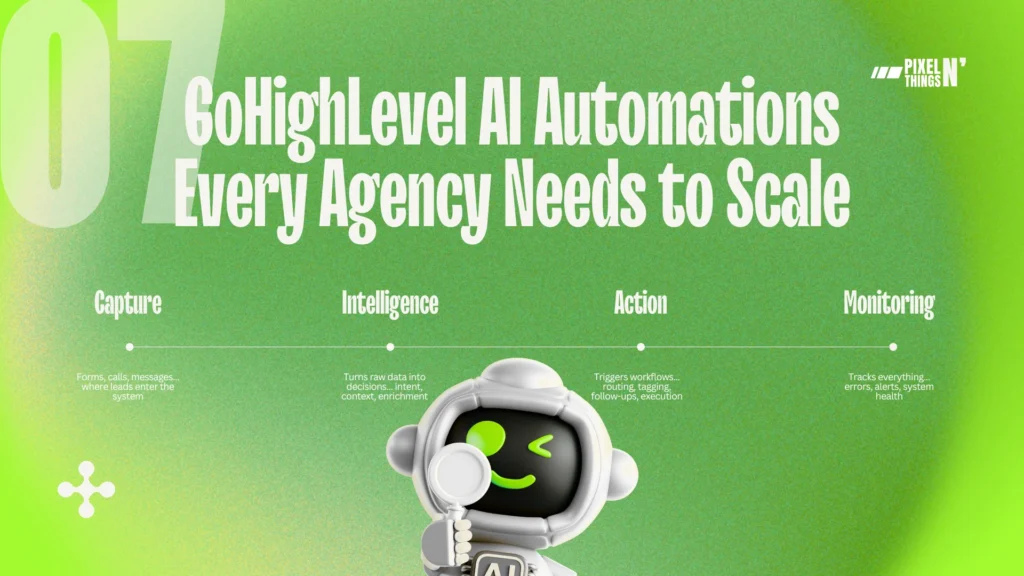
This guide breaks down 7 automations that show where that extra layer fits, mapped to a 4-layer framework that separates a beginner setup from an operator setup.
| Layer | Job | Native GHL | Needs External |
|---|---|---|---|
| Capture | Data enters the system | Forms, calls, chat, DMs, webhooks | Clean payloads, structured entry |
| Intelligence | Data gets interpreted and enriched | Conversation AI, AI Decision Maker, Agent Studio | External CRM lookups, deep enrichment, custom logic |
| Action | System executes something useful | Workflows, tags, pipeline moves, SMS | Cross-tool routing, data cleanup, formatted alerts |
| Monitoring | Verify the whole thing works | Agent Studio metrics, execution timeline | Proactive health checks, balance alerts, failure detection |
The 4 Layers of a Real GHL AI Stack
Most people talk about GoHighLevel AI like it’s one thing. It’s NOT.
What serious agencies actually build is a stack with different layers. Once you stop looking at GHL like “a CRM with some AI features” and start looking at it like a system, the whole thing makes more sense.
You stop asking, “Can GHL do this one task?” and start asking, “Which layer should handle this job?”
In 2026, HighLevel already handles a lot more than basic automations. It has Conversation AI across channels like SMS, Facebook, Instagram, Web Chat, and Live Chat.
It also has tools like Workflow AI, AI Decision Maker, and Agent Studio to help build smarter automation paths inside the platform.
For many businesses, that’s enough, but agencies usually need more structure than that. Not because GHL is weak, because real operations get disorganized fast.
Leads come from different places. Client teams want alerts in different formats. Routing rules get weird. Data needs cleanup. AI outputs need guardrails.
And when something breaks, somebody has to figure out where the mess started. Human beings are amazing at creating edge cases nobody asked for.
That’s why a real GHL AI stack usually has four layers…
- Capture Layer: where data enters the system
- Intelligence Layer: where data gets interpreted, enriched, scored, or classified
- Action Layer: where the system does something useful with that data
- Monitoring Layer: where you check if the whole thing is actually working
This framework is what separates a beginner setup from an operator setup.
A beginner builds inside the tool, an operator builds around it.
Capture Layer
The Capture Layer is the front door of the system.
It’s where leads, messages, requests, and trigger events first enter your system. Before AI can decide anything, before a workflow can route anything, before a team member can follow up, something has to come in first.
That’s the job of capture.
In most GHL setups, the Capture Layer includes things like:
- forms
- inbound calls
- web chat
- SMS
- Instagram and Facebook DMs
- workflow triggers
- webhook events from outside tools
This is one of HighLevel’s strongest areas, because the platform is already built around communication and lead intake.
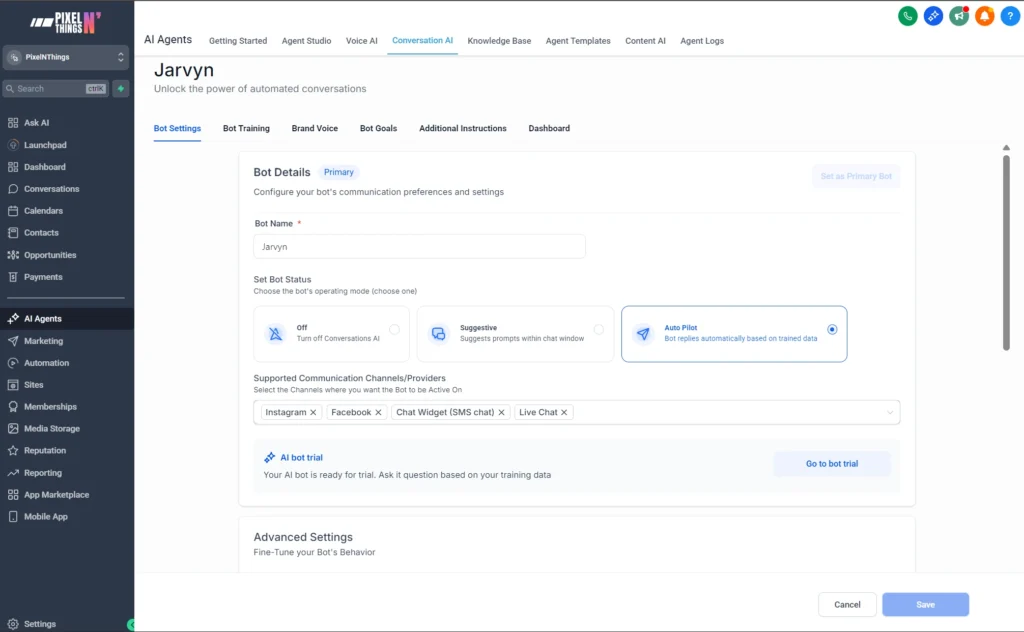
So if all you need is to collect leads and start conversations, GHL already does a lot of the heavy lifting.
But still, this part people miss…
capture is not just about collecting data
It’s about collecting the right data, in the right format, through the right entry point.
That means the Capture Layer is not just “throw a form on a page and pray”, It’s deciding…
- where leads should come in
- what information should be captured first
- which channel makes the most sense for that client
- what should trigger instantly vs later
- what needs to be passed into workflows cleanly
Because bad capture creates bad automation. If the intake is mess, everything after it gets worse.
A weak form creates weak routing. A disorganize webhook creates broken actions. A vague inbound message creates bad AI decisions.
And then people blame the workflow… when the real problem started at the front door.
That’s why serious agencies treat capture like infrastructure.
They make sure forms are clean, calls are tagged properly, chats are mapped to the right pipeline, DMs flow into the right automation, webhooks send usable payloads.
They build the entry points on purpose, because the rest of the stack depends on what gets captured here.
And that’s the real job of the Capture Layer…
get the signal into the system cleanly, fast, and ready for the next layer.
Intelligence Layer
If the Capture Layer is the front door, the Intelligence Layer is the part that figures out what just walked in. This is where raw input turns into usable context.
A form submission by itself is just data. A chat message by itself is just text. A call transcript by itself is just a transcript.
The Intelligence Layer is what gives that input meaning before the system does anything with it.
That usually includes things like:
- lead enrichment
- intent detection
- knowledge retrieval
- AI summaries
- sentiment or branch logic
- CRM and custom-field context
This is one of the biggest reasons HighLevel feels more capable in 2026 than it did a year or two ago.
HighLevel now has better AI tools for understanding conversations, routing contacts, summarizing information, and helping workflows make decisions inside the platform.
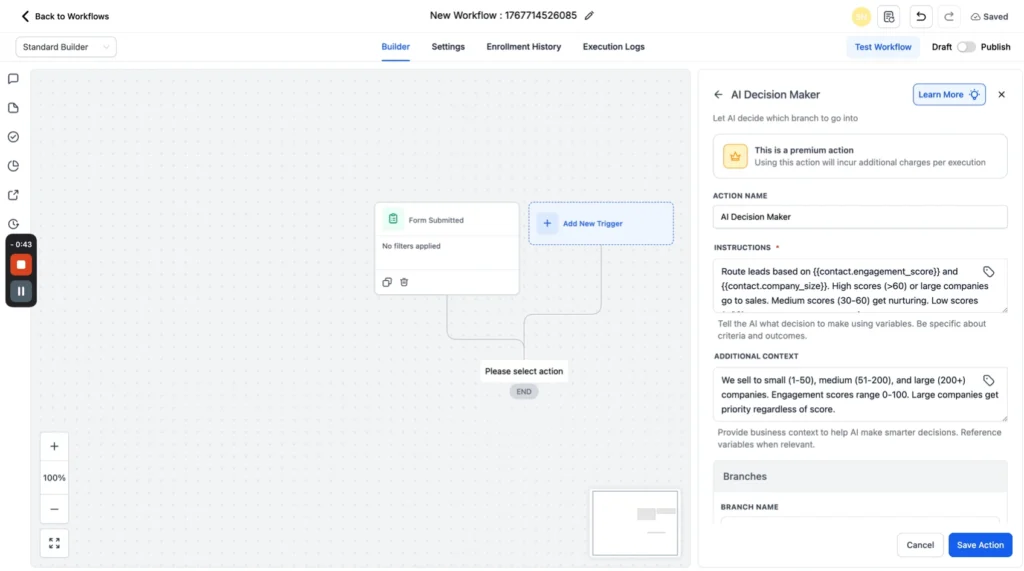
One example is AI Decision Maker. Instead of building huge logic trees by hand, you can give simple instructions and let the system route contacts based on things like engagement, company size, behavior, and other data points.
It also includes AI Intent Detection, which analyzes text and categorizes sentiment so the system can react differently based on how the message feels, not just what field got filled out.
HighLevel’s current workflow action classifies sentiment as POSITIVE, NEGATIVE, or NONE, which is useful for branch logic, escalation, and response handling.
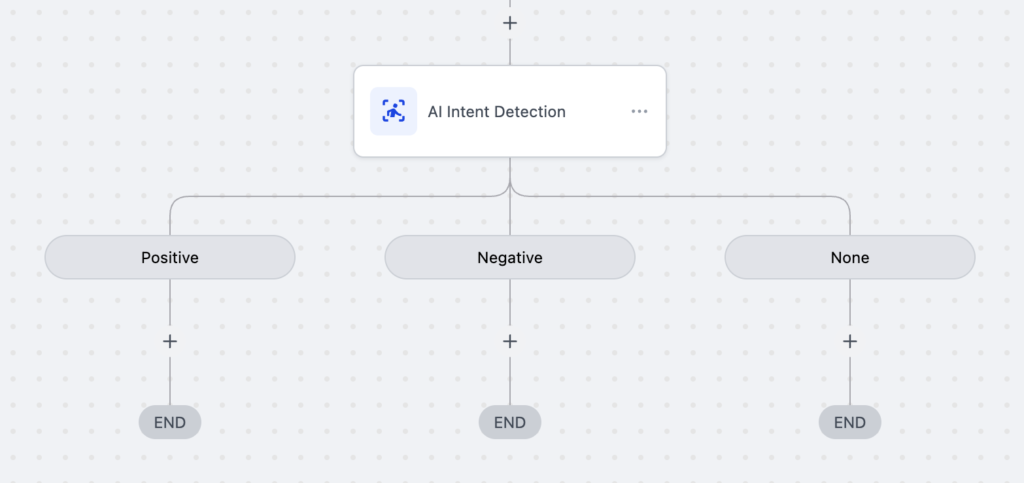
Then there’s AI Summarize, agencies deal with long chats, scattered notes, form responses, transcripts, and constant back-and-forth.
Summarization turns all of that into something shorter and easier to use, so workflows and team members do not have to deal with a giant block of text every time something happens.
HighLevel’s workflow summarization action is built specifically for condensing longer text while keeping the key points intact.
This is also where knowledge retrieval comes in.
HighLevel’s newer AI stack is not just about generating replies. Agent Studio lets you attach knowledge bases and connect tools so the AI can respond with more context and pull from the information you actually want it to use.
That’s important because smart automation is not just “AI says words”. It’s “AI says the right thing based on the right context”.
Agent Studio is positioned by HighLevel as a no-code or low-code system for building agents that can connect APIs and use knowledge bases directly.
And this is where this article’s main point gets even clearer…
Native GHL AI helps a lot here, but serious agencies still build an extra layer around it.
The reason is simple. Context rarely lives in one place.
Some of it is inside GHL, some of it is in custom fields, some of it is buried in past conversations, some of it lives in outside tools, spreadsheets, CRMs, calendars, enrichment APIs, or internal notes.
So the Intelligence Layer is often the place where agencies combine…
- what the lead just said
- what the CRM already knows
- what custom fields already store
- what the knowledge base can explain
- what AI can infer from tone, behavior, or message content
That’s what makes the next step smarter.
Without this layer, automation is mostly guessing. With this layer, automation starts making better decisions.
A beginner workflow says… “If form submitted, send message”
An operator workflow says… “Figure out who this lead is, what they want, how serious they sound, what we already know about them, and what should happen next.”
That’s the real job of the Intelligence Layer.
It doesn’t just move data. It adds context before action.
Action Layer
The first two layers are about input and understanding. This one is about what actually happens next.
Once a lead is captured and the system has enough context, something needs to move. Right now.
That’s the Action Layer.
It’s the part of the stack that routes leads, assigns users, sends alerts, updates opportunities, tags contacts, triggers workflows, and pushes data where it needs to go.
It turns information into execution.
Inside GHL, this is where workflows do a lot of the heavy lifting. GHL handles workflow automation, webhooks, and API access, so it can fire actions internally and pass data out to other tools when needed.
But this is also where a serious setup usually stops being just GHL.
Not because GHL can’t fire actions, it CAN. The real question is whether it should handle the whole chain on its own.
For simple stuff… absolutely. Tag a contact, move an opportunity, send an SMS, fire a basic webhook, GHL is plenty.
But the moment an action needs cleanup, branching, fallback logic, or coordination across multiple apps, that’s where something like n8n earns its spot.
n8n has a native HighLevel node for contacts, opportunities, tasks, appointments, and calendars, and supports custom API calls when the native node isn’t enough.
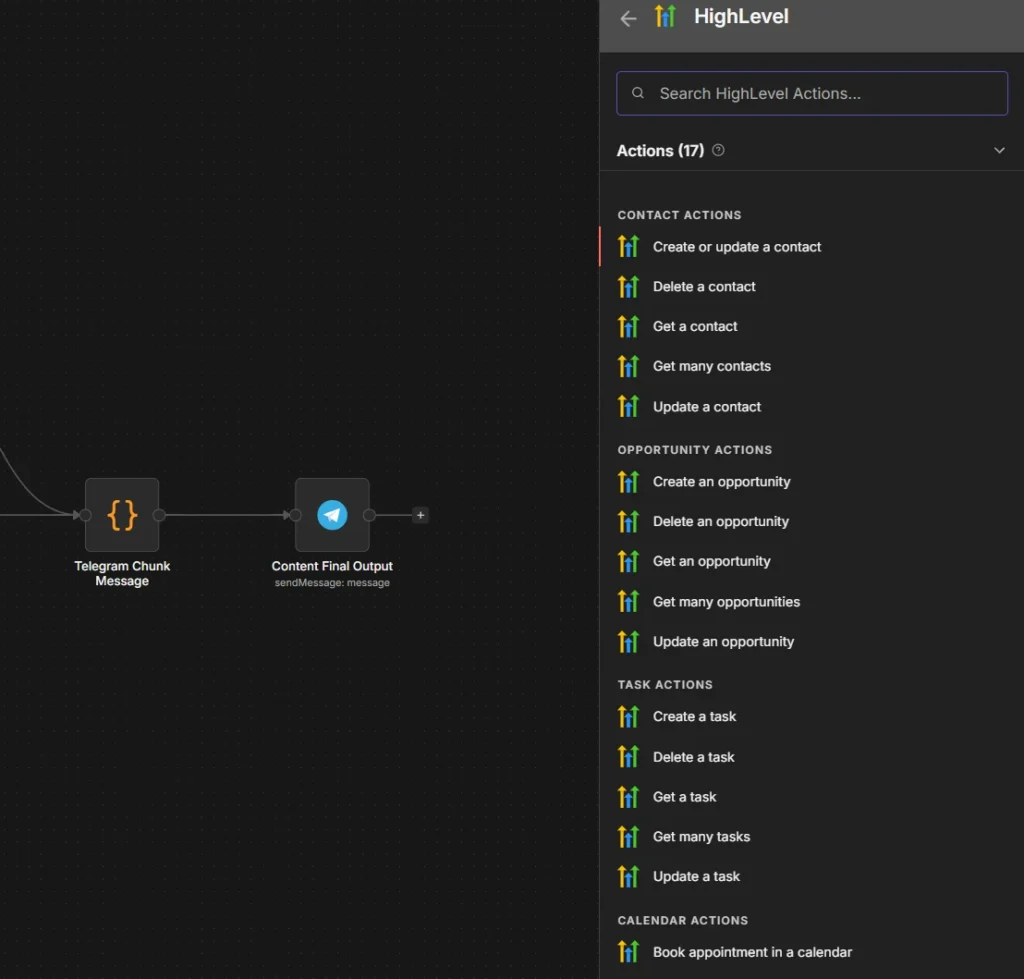
That’s why the Action Layer is really about orchestration.
GHL is great at being the system of record and handling customer-facing automation.
n8n is great at handling the messy middle, cleaning data, branching logic, connecting tools GHL doesn’t natively support, formatting outputs, and running multi-step flows without turning your account into a spaghetti monster with 50 workflows pretending to be a strategy.
Simple way to think about it… GHL is the engine. n8n is the transmission.
GHL stores the contact, tracks the opportunity, sends the message, keeps the CRM in sync.
n8n takes the signal from GHL, decides where it goes next, reshapes it if needed, and moves it across the rest of the stack.
So in practice, the Action Layer might look like this…
- A lead fills out a form in GHL, it captures it and starts the workflow.
- n8n receives the webhook, checks the data, enriches or cleans it, routes it based on rules, sends the right alert to the right team, writes the record to another tool, then sends the result back into GHL.
That is a real operator stack.
Not because it is more complex for the sake of it, because it is more reliable when the workflow actually matters.
A simple rule of thumb is…
- Use GHL when the action should stay inside the CRM
- Use n8n when the action needs to cross systems, transform data, branch hard, or touch tools GHL does not handle well enough on its own
That is the job of the Action Layer… take the signal, make the move, and keep the whole system in motion.
Monitoring Layer
Most people skip this one entirely, then wonder why a webhook silently died, an AI bot went off the rails, credits ran out mid-campaign, or a lead routing rule just… stopped working.
Nobody noticed, nobody got an alert. The client found out before you did.
That’s what this layer is for.
Not debugging after the damage is done. Catching it before it becomes a problem.
The stuff it watches for… failed integrations, low balances, webhook errors, AI drift, missed routing, silent failures, workflows that technically ran but did nothing useful.
What GHL gives you natively
GHL has improved here. Agent Studio now includes a Message Execution Timeline, Performance Metrics, and a Chat Emulator. Useful tools, genuinely. Great for understanding why one agent responded weird in one conversation.
But that’s inspection, is not monitoring. It helps you investigate a specific thing after you already know something went wrong.
It doesn’t sit in the background watching your whole operation and flagging issues before clients notice.
That gap is why serious agencies layer something external on top.
What to actually use
n8n
Use n8n as the internal auditor. It is great for scheduled checks, fallback logic, and internal alerts.
For example, it can run cron jobs, hit APIs to confirm tags got applied, verify an opportunity actually moved, check whether a workflow completed the way it should have.
When something breaks, n8n sends the alert to Slack, email, or wherever your team actually looks.
It already integrates with HighLevel natively plus supports custom HTTP calls, so it fits without a lot of extra setup.
Datadog MCP
Use Datadog MCP if you have a bigger stack
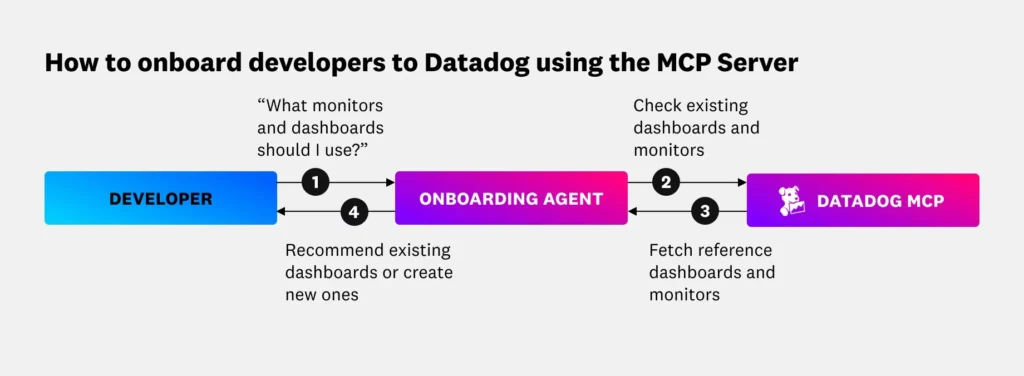
They launched their MCP Server in March 9, 2026, giving AI agents direct access to logs, metrics, and traces. If your GHL setup connects to custom apps, APIs, or a larger backend, Datadog gives you AI-assisted debugging across the whole system, not just inside one workflow.
Sentry
This is the right call if you own any frontend code. Embedded forms, custom scripts, react components, your own SaaS layer, Sentry catches app errors and broken UI behavior fast.
It also has an MCP server now, aimed at debugging workflows with coding agents. If you’re not running custom code, you probably don’t need it. If you are, it’s the obvious choice.
OpenClaw
This is a interesting but optional. It’s a personal AI assistant platform that can theoretically handle transcript reviews, QA checks, and drift analysis across tools. Worth experimenting with if you want agentic QA. Not worth recommending as a core part of your ops stack yet.
So short version is…
- GHL helps you debug inside the platform
- n8n helps you catch operational failures
- Datadog helps you see the whole system
- Sentry helps you catch app and frontend issues
- OpenClaw can help with advanced QA, but it is optional
That’s the job of this layer… stop running blind, and stop finding out about problems from the people paying you.
TBH, HighLevel’s native AI stack is getting better fast, but stronger does not mean complete, especially when agencies need cross-tool routing, deeper research, custom data handling, and proactive ops monitoring.
| Feature | Native GHL AI | Operator Stack | Why? |
|---|---|---|---|
| Basic chat replies | Good | Good | GHL handles this well natively |
| Appointment booking | Good | Good | Both can support it easily |
| Workflow generation | Good | Better 👌 | AI can help build faster, but human-in-loop still matters |
| Deep lead research | Limited | Strong | External tools can enrich, scrape, and structure more context |
| Cross-tool routing | Limited | Strong | n8n/Make is built for moving data across apps |
| Internal operations tracking | Weak | Strong | External workflows are better for back-office logic |
| Polished Slack/Discord alerts | Weak | Strong | Easier to format and route outside GHL |
| Proactive system monitoring | Weak | Strong | GHL helps debug, but not full-stack health monitoring |
| Custom data enrichment | Limited | Strong | External APIs and enrichment tools fill the gap |
| Multi-step external orchestration | Limited | Strong | This is where n8n really wins |
The 7 Workflows (Mapped to the 4 Layers)
Up to this point, this is all theory. Capture. Intelligence. Action. Monitoring.
Nice framework, looks smart. Feels organized.
But none of that matters if it doesn’t turn into something real.
Because agencies don’t get paid for “understanding systems”. They get paid for workflows that actually run, don’t break, and help close deals.
So instead of another list of random automation ideas, this is a breakdown of 7 real workflows, mapped directly to the 4 layers.
Each one solves a specific problem agencies deal with every day…
- bad lead quality
- messy routing
- slow follow-up
- broken automations
- zero visibility into what’s actually working
Some of these can be partially done inside GHL, but the full version, the one that actually works clean at scale, usually needs that operator layer around it.
Let’s start with the first one.
Advanced Lead Enrichment
Layer: Capture + Intelligence
Everyone knows the old speed-to-lead rule. Reply fast.
Great, that advice is everywhere. The problem is most teams are replying fast with absolutely nothing useful to say.
They get a name, an email, maybe a company, then fire off a generic message like that’s supposed to close anything. It DOESN’T. It just proves the system is quick, not smart.
The better move is reply fast with context.
That’s what lead enrichment actually does.
GHL handles the capture side fine. Lead fills a form, books a call, sends a message, GHL stores it and kicks off the workflow. No issues there.
What it doesn’t do is give your rep anything to work with.
It won’t tell them what the company actually does. Won’t tell them if the website looks legit or like it was built in 2010 and forgotten after that.
Won’t tell them what kind of offer the lead is probably running. Definitely won’t hand your rep a smart opener to kick things off.
So instead of treating lead capture like the end of the process, you add one more step in between.
Here’s how it runs…
- a new lead enters GHL
- n8n grabs the trigger
- an external AI or research step checks the lead’s website, company info, public profile, or business data
- the useful summary gets pushed back into GHL notes or custom fields
- the rep gets a Slack or Discord alert with actual context, not just raw contact info
So instead of your rep seeing…
“New lead: Sarah, marketing agency, booked a demo”
They see something they can actually use…
“Sarah runs a small agency. Site looks clean but thin on proof. No clear offer stack. Service pages are pretty vague. Probably a good fit for funnel positioning or backend automation”
That’s a completely different starting point.
Now your rep can open like a human who did their homework, not like another bot that fired a templated message two seconds after the form submitted.
Why this actually matters, because a lot of agencies have this exact problem and don’t even realize it. They’re fast, they’re just not saying anything worth responding to.
Generic follow-up kills deals quietly. No obvious reason, the lead just goes cold and moves on.
Lead enrichment fixes that by giving your team better talking points before the first message goes out.
Better context, better personalization, better shot at starting a real conversation instead of another forgotten drip sequence.
The lead comes in through GHL. The context gets added through enrichment. The outreach gets sharper from the very first touch.
That’s the whole point of sitting this workflow between Capture and Intelligence.
The Professional Webhook Bridge
Layer: Capture + Action
Webhooks are genuinely powerful. The way most agencies use them though? Honestly… kind of useless.
They take a clean event from GHL and dump a wall of raw JSON into Slack or Discord.
Nobody reads it, nobody knows what to do with it. The notification shows up, gets skimmed for half a second, and gets ignored.
So technically the system works, but nothing actually happens.
That’s the problem this fixes.
The real issue isn’t the DATA, it’s the FORMAT.
Agencies don’t need more notifications. They need notifications that are…
- readable
- relevant
- actionable
If someone has to decode a webhook payload like they’re solving a puzzle just to figure out what happened, they’re not going to bother. They’ll scroll past it and move on.
And that “automated” system you built just became another thing nobody uses.
The Beginner Way:
json
[Webhook Bot]:

{
  "contact_id": "123",
  "status": "active",
  "value": "1000",
  "source": "fb_ads"
}
How to fix it…
- GHL sends a webhook when something happens (new lead, booking, pipeline move, etc.)
- n8n receives the payload
- n8n reshapes the data into something clean
- that gets sent as a proper Slack block or Discord embed
Instead of raw JSON, your team sees something like…
- who the lead is
- what they want
- how valuable they look
- who owns it
- what should happen next
The Operator Way: 🚨 NEW HIGH-VALUE OPPORTUNITY
Client: John Doe ($2,500/mo potential)
Source: Google Ads (Keyword: “SEO Agency”)
Owner: @Sarah_Rep
Status: Needs Audit
Action: [Click here to open GHL Contact]
See here is no guessing, no decoding. No digging through raw data to find the one field that actually matters.
This is one of the easiest upgrades you can make. Just with better formatting.
But the impact is immediate…
- faster internal response
- less confusion
- fewer missed opportunities
- better team coordination
- it turns your alerts from noise into something your team actually uses.
The pieces are already there…
GHL already supports webhook events. n8n can catch, reshape, and route the data. Slack and Discord both support structured message formats, blocks, embeds, the whole thing.
Most agencies just never connect them cleanly. They hook up the raw webhook, see it “working,” and move on. Then wonder why the team isn’t responding to leads fast enough.
Automated Commission Tracking
Layer: Action
When most people start an agency, almost all of their attention goes to the front end.
Getting leads, closing deals, building better workflows, setting up the AI stack, trying to make the whole machine run faster.
That makes sense. In the beginning, survival lives on the front end. If deals are not coming in, nothing else matters.
But the moment you start hiring reps or bringing other people into the sales process, a different kind of problem shows up.
Payout accuracy.
And this is exactly the kind of problem a lot of agency owners ignore for too long, because it looks small right up until it starts damaging trust.
In a lot of agencies, commission tracking is still held together by memory, spreadsheets, and good intentions.
A deal gets marked Won in HighLevel, and then someone, usually the owner, is expected to remember to log it somewhere else later.
That works… until it doesn’t.
Because once that manual step gets skipped, delayed, or logged wrong, the problem stops being “admin.” It becomes a money problem, and money problems inside a team are never small.
When a rep feels like payouts are fuzzy, inconsistent, or open to interpretation, their focus shifts. They stop thinking about the next deal and start thinking about whether the business is tracking their work properly.
That is not where you want your team’s energy going.
This is why automated commission tracking is such a high-value workflow, even though it sounds boring on paper.
The setup is pretty simple… the goal of this workflow is to remove human memory from the equation entirely.
- a deal is marked as “Won” or “Paid” inside GHL
- n8n pulls the specific deal value and the assigned team member. It then applies your specific commission logic (e.g., 10% of the first month, or a flat fee per lead)
- n8n pushes that data into an immutable ledger, like a Google Sheet, Airtable, or your internal database
This creates a “Single Source of Truth”. The second a deal is closed, the commission is logged. There is no backtracking at the end of the month, and there are no arguments about which rep owned which lead.
This one workflow removes a surprising amount of friction.
Now the business has a record, the rep has visibility, the payout logic stays consistent. And nobody has to rely on memory or clean things up at the end of the week.
That is why this one matters, because it protects trust.
And in a growing agency, when people trust the numbers, they stay focused on performance. When they do not, every payout becomes a tiny source of tension.
This workflow fixes that before it turns into a bigger problem.
The Context-Aware Conversation Layer
Layer: Intelligence + Action
Let’s get something out of the way first.
GHL’s Conversation AI is not what it was a year ago. It handles conversation history better now. It works across multiple channels.
The knowledge sources got a serious upgrade, you can feed it tables, rich text, files, and it re-ranks results so responses actually make sense. There’s even a public API now so you can set up agents, pull conversation data, and control the whole thing programmatically.
For a lot of agencies, that’s genuinely enough. If your use case is straightforward, answer questions, book appointments, follow a script, native Conversation AI can handle that without bolting anything extra on top.
So this section isn’t about replacing it. It’s about what happens when your context model gets more demanding than what a single bot layer can carry.
Where native starts to stretch
Conversation AI works well when the information it needs lives inside GHL. Knowledge bases, contact records, pipeline data, all fair game.
But some agencies run into situations where the bot needs context that doesn’t live there.
- maybe it’s a CRM lookup from an external system
- maybe it’s custom business logic that changes based on the client’s plan tier, their location, or something specific to how your agency structures deals
- maybe it’s role-aware routing, where the response isn’t just based on what the contact asked, but who they are and what stage they’re at across multiple systems
That’s where you start needing what I’d call context orchestration.
Not just a smarter bot, but a smarter layer underneath the bot that decides what information gets pulled in, from where, and how it shapes the response before anything gets sent.
A practical version of this workflow looks like this…
The native Conversation AI handles the conversation, that part stays. But before a response fires, n8n pulls in the external context. That might look like…
- checking a separate CRM for deal history or account status
- running custom business rules that live outside GHL
- pulling from external knowledge sources, internal docs, SOPs, product databases, pricing engines
- attaching structured memory so the bot isn’t just responding to this message, but responding with awareness of the full relationship
- then that enriched context feeds back into the conversation, and the response that goes out actually sounds like it knows what’s going on
Not just “I found a match in the knowledge base”, More like “I know who you are, what you’ve bought, what stage you’re in, and what matters right now”.
TBH, most agencies won’t need this on day one, and that’s fine.
But the ones running more complex operations, multiple service tiers, external tools, layered fulfillment, they hit a ceiling where the bot knows the words but doesn’t know the situation.
That’s not a Conversation AI problem, that’s a context problem. And context orchestration is how you solve it without ripping out what already works.
This is one of those advanced HighLevel automations that separates agencies running a chatbot from agencies running an actual intelligence layer. Use the native tools where they fit, just extend them when your operation demands it.
That’s the smarter play, and honestly, it’s the more credible one too.
Intent-Based Voice Routing for Real Calls
Layer: Capture + Intelligence + Action
If someone fills out a form on your site right now, what happens? They get tagged, they get a follow-up, they get pushed into a pipeline. Maybe they get assigned to a rep. All automatic.
Now what happens when someone calls? Yeah, exactly.
Somebody picks up, maybe takes notes, maybe doesn’t. The notes might make it into the CRM, or they sit in someone’s head until Monday when they’ve already forgotten half of it.
Every other input in your system triggers automation. Calls just… happen, and then someone has to manually deal with it later.
And that is a huge missed opportunity.
GHL has Voice AI Agents now. Actual voice agents, not just a forwarding number with a greeting.
- you can build logic in Agent Studio
- you can run voice through the chat widget in-browser
- you can test how agents behave before anything goes live
So for straightforward stuff, qualifying inbound calls, routing to the right department, handling basic questions, you can set that up natively and it works.
But here’s where agencies start doing something different with this.
Think about what a call actually contains.
Someone says “I want to cancel”, that’s not just a sentence. That’s INTENT. And intent is a TRIGGER.
Someone says “I’m ready to move forward”, also INTENT. Different TRIGGER.
“I need help with onboarding”, Intent. Different flow entirely.
Right now most agencies hear those words and then a human decides what to do. Tag this, assign that, send a follow-up, remember to update the pipeline.
What if the call itself handled all of that?
- Native path: Voice AI detects the intent. GHL workflow fires, contact gets tagged, assigned, routed into the right sequence. DONE.
- Extended path: Intent gets passed to n8n. n8n checks the external CRM for account status. Runs your custom logic, maybe cancellation requests from clients under 90 days get handled differently than long-term accounts.
Maybe upgrade intent triggers a different sequence depending on plan tier. Then it routes, notifies, and logs everything across systems GHL doesn’t touch.
Same call but way more intelligent.
The notification piece matters too.
Your team shouldn’t get “missed call from 407-555-1234“.
They should get “Sarah from Greenline Marketing called about cancellation. She’s been on the Growth plan for eight months. Last support ticket was six days ago. Assigned to James. Follow-up sequence started.”
This is not a phone system. This is an awareness layer that happens to start with a phone call.
This is honestly one of the more underrated GoHighLevel workflow examples because voice just doesn’t get the same attention as chat or email automation.
But the agencies building real advanced HighLevel automations are starting to treat every call as structured data, not just a conversation that someone needs to remember.
Use the native Voice AI and Agent Studio for the core logic. It’s more capable than most people think.
Layer n8n underneath when the routing gets complex, the decisioning touches outside systems, or the follow-up logic needs more nuance than a single platform can handle.
Calls aren’t dead-end events anymore. They’re just another input. And once you wire them up like one, your GoHighLevel agency automation starts covering the one channel most agencies still handle manually.
Fixing the Missed-Call-Text-Back Loop
Layer: Capture + Action
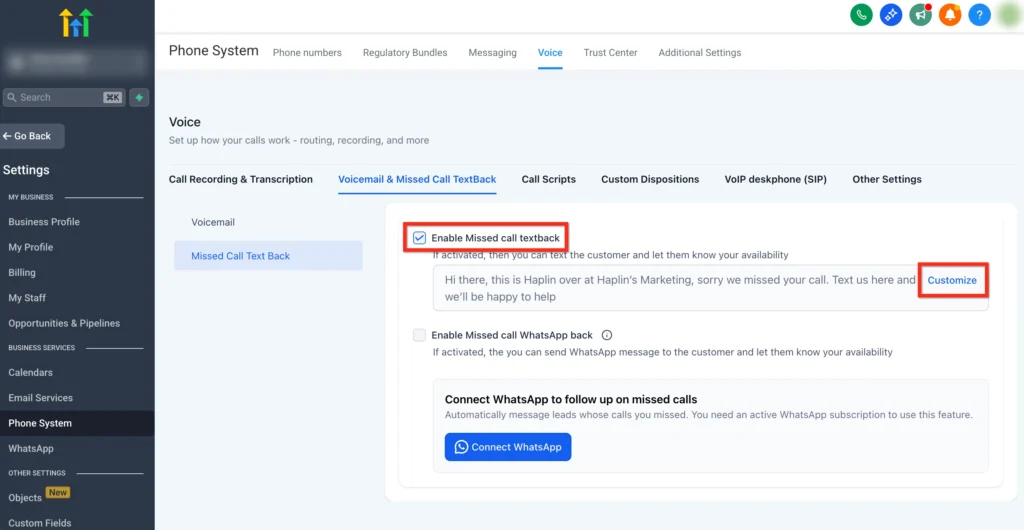
This is one of those agency problems that should be dead by now, but somehow it keeps coming back.
A lead calls, nobody answers. A missed-call text-back is supposed to save the moment and keep the lead warm.
Simple enough, until the setup gets weird.
Now the call gets forwarded three different ways, the wrong event fires, the text goes out at the wrong time, or worse, it goes out more than once.
Sometimes the lead is still on the phone while the system is already texting them like they were ignored.
Sometimes a forwarded call creates a fake “missed call” event and starts a follow-up loop that makes the business look completely broken.
And when that happens, the client does not blame the phone setup.
They blame the agency.
That is why this workflow matters.
The business problem is very simple… missed calls lose leads. But bad forwarding logic makes the fix almost as damaging as the problem.
Instead of recovering the lead cleanly, the system creates awkward follow-up, false triggers, and weird behavior that makes the business feel disorganized right at the worst possible moment.
The cleaner setup is to treat the missed call like a controlled event.
- inbound call hits intermediary logic first
- system tries the real ring path
- If nobody answers, then a clean webhook or workflow fires
- missed-call text-back goes out once
If you want a fallback beyond that, a task gets created, the team gets notified, or a retry gets scheduled for later. But the text-back itself is a one-shot thing. Not a LOOP.
That is the whole point here. Not to add more automation, but cleaner automation.
Because this is one of those boring workflows that nobody notices when it works, but everybody notices when it breaks.
Your clients don’t care about “AI agents” if they are still losing leads to a busy signal. By building a bulletproof missed-call system, you prove that your automation actually protects their revenue.
You move from being “the person who handles the tech” to “the person who makes sure we never miss a deal.”
The Agency Heartbeat Monitor
Layer: Monitoring
A serious agency should not find out a client’s system is broken from an angry message.
That is the whole point of this workflow.
Most agencies are still reactive. Something fails, a client notices, then support starts digging. But by then, the damage is already done.
The missed leads are missed, emails did not send, calendar path broke, AI agent stopped responding, client’s “Wallet Balance” hits zero and their SMS stops sending, or if an API token expires and their leads stop flowing into the CRM.
Now everybody is scrambling, and somehow this becomes “the agency’s fault,” because of course it does.
A serious agency doesn’t wait for things to break. They build a Heartbeat Monitor.
The better setup is to monitor the stuff that quietly breaks first.
Things like…
- low wallet balance
- Twilio credit or phone issues
- email sending or integration problems
- disconnected webhook endpoints
- API auth failures
- broken calendar paths
- inactive automations
- workflow errors
- AI agent response failures
GoHighLevel uses a usage-based “Wallet” model for almost everything (AI, SMS, Voice, Phone, Email, WhatsApp). If that balance runs dry, the entire machine grinds to a halt.
The “Heartbeat Monitor” is an n8n workflow that acts as your agency’s early warning system. It doesn’t manage the leads, it manages the health of the system itself.
Instead of checking 50 sub-accounts manually, you let n8n do the rounds….
- The Scheduled Check: Every morning at 8:00 AM, n8n runs a “health check” across all your active client accounts via API
- The Threshold Logic: It compares the current status against your “safety” numbers (e.g., Is balance < $10? or Is the last lead over 24 hours old?)
- The Internal Alert: If anything looks off, it doesn’t bother the client. It sends a single, consolidated “Ops Report” to your team’s Slack or Discord channel
- The Ticket: For critical failures, it automatically creates a high-priority task in your project management tool (like ClickUp or Linear)
That is what makes this powerful.
It turns your agency from Reactive Support (fixing things after they break) into Proactive Infrastructure (fixing things before anyone notices).
When you can tell a client, “Hey, I noticed your SMS balance was low, so I went ahead and topped it up for you to keep the leads flowing,” you stop feeling like a freelancer babysitting automations. You start operating like the person running real systems.
Bonus: The Hybrid Stack That Makes More Sense in 2026
There’s a weird debate happening in the GHL community right now and it goes something like this.
One side says go all-in on native. Use what’s built in. Stop overcomplicating things.
Other side says native is limited. You need external tools for anything serious.
Both are wrong or more accurately, both are right, but only for specific situations. And the agencies that figure out which situations get which approach are the ones building systems that actually hold up.
By this point, the answer should be obvious…
It is not native only. It is not external everything.
It is…
- Native where it’s fast
- External where it’s flexible
- Monitoring where it’s critical
That’s it. That’s the framework.
Not more complicated than that. But most agencies either over-rely on native and hit ceilings they can’t explain, or over-engineer with external tools and spend three weeks building something GHL already does out of the box.
So here’s the split…
| If the job needs… | Best move | Why |
|---|---|---|
| Fast setup and low friction | Keep it native | Fewer moving parts, faster to launch, less maintenance |
| Tight connection to CRM activity | Keep it native | The trigger, contact, and action already live in one place |
| Simple execution with predictable logic | Keep it native | No reason to drag in another layer just to feel sophisticated |
| Cross-platform coordination | Go external | Once the workflow touches other systems, native starts getting cramped |
| Custom rules or edge-case handling | Go external | This is where flexibility matters more than convenience |
| Data cleanup, reshaping, or translation | Go external | One system’s clean output is another system’s ugly input. Somebody has to mediate |
| Internal operations that clients never see | Go external | Back-office logic usually belongs outside the front-end platform |
| High-stakes reliability | Add monitoring | If failure costs money, trust, or leads, don’t wait for a human to notice |
| Recovery when something breaks silently | Add monitoring | Quiet failures are the expensive ones |
| Complex memory, research, or reasoning | Use external AI carefully | Only when native logic stops being enough and the workflow genuinely needs deeper thinking |
Use external AI only when the reasoning demands it…
- Non-standard logic that doesn’t fit a simple if/then. Custom memory or enrichment that goes beyond what Conversation AI’s knowledge base supports.
- Research-grade lookups that need to pull from multiple sources. Multi-system reasoning where the AI needs context from three different tools before it can make a decision.
- High-control orchestration where you need to manage exactly what the model sees, how it responds, and what happens after.
If you’re not hitting those walls, you don’t need external AI. Native Conversation AI with the updated knowledge sources and Agent Studio handles more than most agencies will ever push it to.
Agencies that do well with HighLevel agency automation aren’t the ones using the most tools. They’re the ones using the right tool for each job.
Native GHL for speed and simplicity. n8n for flexibility and cross-platform coordination.
External AI for the edge cases where reasoning needs to be deeper or wider than one platform allows.
Monitoring for the stuff that breaks quietly and costs you trust.
And with everything GHL has added, Voice AI, Agent Studio, expanded Conversation AI, richer knowledge sources, public APIs, the native layer covers way more ground than it did even a year ago.
When you use them together, you stop fighting against the limitations of your software and start building infrastructure that actually scales. This is how you move from “running an agency” to “owning a system.”
Frequently Asked Questions
About

Nick Chauhan
Web Developer & Founder Of PixelNThings
I build AI-powered systems that actually ship. Agents, automations, full-stack apps. Claude, Cursor, Gemini, MCP, n8n, Stitch etc.. Also design high-converting funnels and website on Systeme.io, WordPress & GoHighLevel. I post what I build.

